AstraZenecaPart 5 of 5
AI prototypes as cheap tests
Each prototype tested one question for the person who would decide. The forecasting prototype showed the working version had no AI yet, so its technical and forecasting leads handed the non-AI core to a capabilities team and deferred the AI layer. When ten requests competed for my time, the IT leads set one order and I routed new asks through them. I designed the interfaces. Other people owned the models, agents and data behind them.
- Role
- My contract title was Senior UI/UX Business Analyst; I also worked as a UX designer and AI engineer. I designed and built across compliance, internal products, forecasting and medical AI, with business owners and engineering teams.
Facts
- Engagement
- August 2025 to August 2026
- Contract title
- Senior UI/UX Business Analyst
- Business units
- US Oncology, then Global Medical Affairs from May 2026
- Released
- Risk register, March 2026. Spec by me, built by ECS.
- PinkPulse
- Working resource hub for the breast franchise; I designed its discovery and interface directions.
- AI Workbench
- Working Global Medical Affairs product; my interface and workflow prototypes shaped the shared experience.
- Worked with
- A Compliance business owner and reviewers, AstraZeneca's delivery team ECS in India, medical specialists, engineers and a leadership sponsor
Prototype, then hand off
What I was asked to do
In March 2026 my manager set out the scope of our work. We would design the target user experience and build the prototype. When a prototype was ready, we'd hand it to an engineering group to build. He also asked me to find a smaller scope inside each request before I started prototyping.
That turned every prototype into a test. A business team brought an idea. I cut it down to the question that mattered most, built enough to answer it, and put it in front of the people who would decide. Their answer set the next step: keep it, change it, hand it on or stop.
Over the year I made 55 Figma Make files across about 20 workstreams. Fourteen of those files are copies or variants of another one, so there were fewer ideas than files. The file count matters less than what each prototype taught the team, and for some of them nobody wrote that down. That includes me.
Contribution
I designed the interfaces and built the prototypes. Business leads owned the problems and made the calls. Engineers and data teams owned the models, agents and data, and anything that moved toward production.
Narrow the request before building
Requests arrived bigger than one prototype could test. Before building, I tried to name the one question the prototype had to answer and the person who would judge the answer. Then I built the smallest version that could answer it. On the forecasting tool I did it the other way round. I built a large prototype first, then had to stop and go back to how forecasters actually work.
How I briefed Figma Make
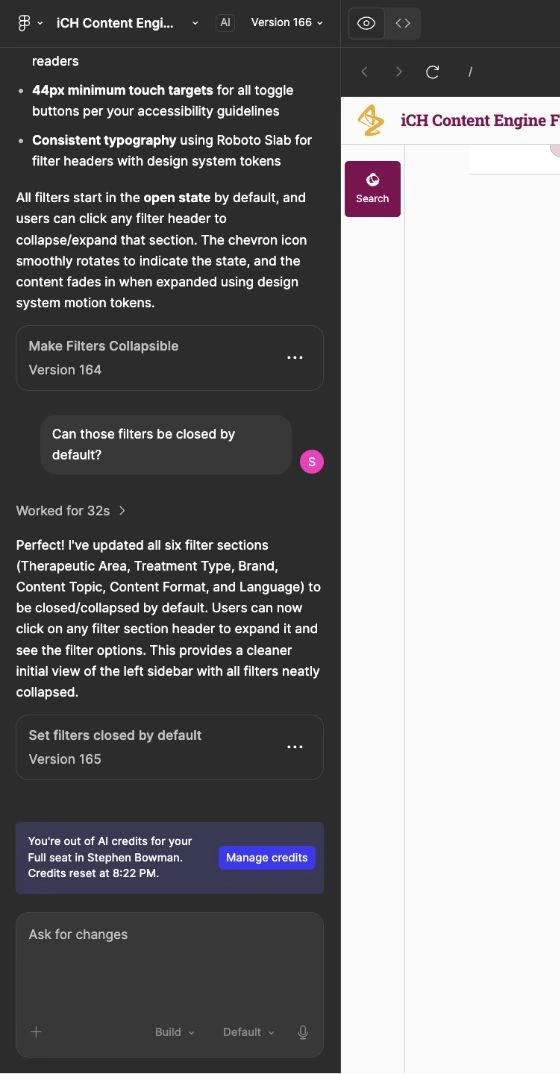
I wrote each Figma Make request as a small spec. It named the accessibility rule, the design-system token or the exact control state the change had to respect, and the panel below shows one request with the tool's reply.
A request and the change it reports
Keeping the moving pieces traceable
In April 2026 I built a personal Obsidian work intelligence wiki from meeting transcripts. It linked source notes, workstream pages and an action register so I could trace a current decision to its source and next action. I have no record of team adoption.
Ten projects, one queue
Too many yeses
By spring 2026 requests reached me from brand teams, IT, forecasting, field teams and Compliance. On 1 April I told the IT project lead that I was spread thin across ten or eleven things. She set my order that day. The head of US Oncology's requests came first. The shared assistant shell went to the bottom. The research governance assistants were paused, because nobody had approved a budget for their next phase.
She also set a rule. Every new request had to go through the team's three leads, because they knew where the budget came from and who was paying for whose time.
Send new asks to the people who set priorities
I used the rule instead of absorbing the work. The same day I passed a hematology team's request, which amounted to five applications, to the leads to decide. On 22 April I sent them a list of everything I had worked on and asked them to reorder it. On 28 April I asked whether two finished prototypes should go anywhere. The terminology lookup was archived as not a priority, and the shared shell was folded into the US Oncology head's own agent.
Contribution
The leads set the priorities and made each call. My part was to bring every request to them instead of saying yes on my own.
Forecasting: the AI wasn't the first job
The ask
A forecasting team wanted to move its forecasts out of spreadsheet models and into a guided tool with AI help built in. Their lead sent a detailed requirements document and, later, written notes on my screens. The question I set out to test was whether a clickable version of the workflow would get stakeholders behind the project and the work funded.
What the prototype taught us
6 March 2026
I had a large, detailed prototype. I paused it and told the team this was the point where I should go back and understand their workflows. We then checked the prototype against their real spreadsheet models.
The lead's notes
He asked for fewer pages, or pages grouped by workflow. He asked whether one AI input could handle both chat and search, in the same place on every screen. "My recent activity" became priority 2 for the first release. The prototype never shrank to match. The latest file still has 18 pages and two AI inputs.
6 April 2026
The demo couldn't run. The collaborator who built the working Python version had lost access to his account. The meeting still produced the main finding. The forecasting lead saw that the working version had, in his words, "basically no AI" at this stage and wouldn't give much value by itself. Scope and ownership had also shifted above our team, so I said I'd confirm the handoff before signing anyone up for anything.
17 April 2026
The collaborator demonstrated the working version, a Python core in four stages. Load the inputs, build the patient funnel, edit the assumptions, run the forecast. The technical lead explained the plan to add AI one step at a time, once the Python framework had proved itself. A capabilities team would take the code and add the AI layer on its data platform.
Outcome: the core was handed off and the AI layer deferred
The technical lead and the forecasting lead made the call. The non-AI core went to the capabilities team, and the AI layer became that team's next job. My Figma prototype went along as the target view. I offered to write a document mapping its screens to the smaller first-release scope, so the next team could see what existed, what was planned and what was only a picture.
The gap was the lesson
My prototype showed 18 pages and an AI assistant on every one. The working code had four stages and no AI. With both on the table, deferring the AI became a planning decision instead of something the next team found out later.
A senior forecaster asked whether the framework could stretch to the complexity of their real models. Nobody could answer that yet, and the meeting didn't pretend otherwise.
Scope
I don't know what the capabilities team built after the handoff.
What was drawn versus what was handed off

Design detail: the forecasting screens
Show the assumptions behind a change
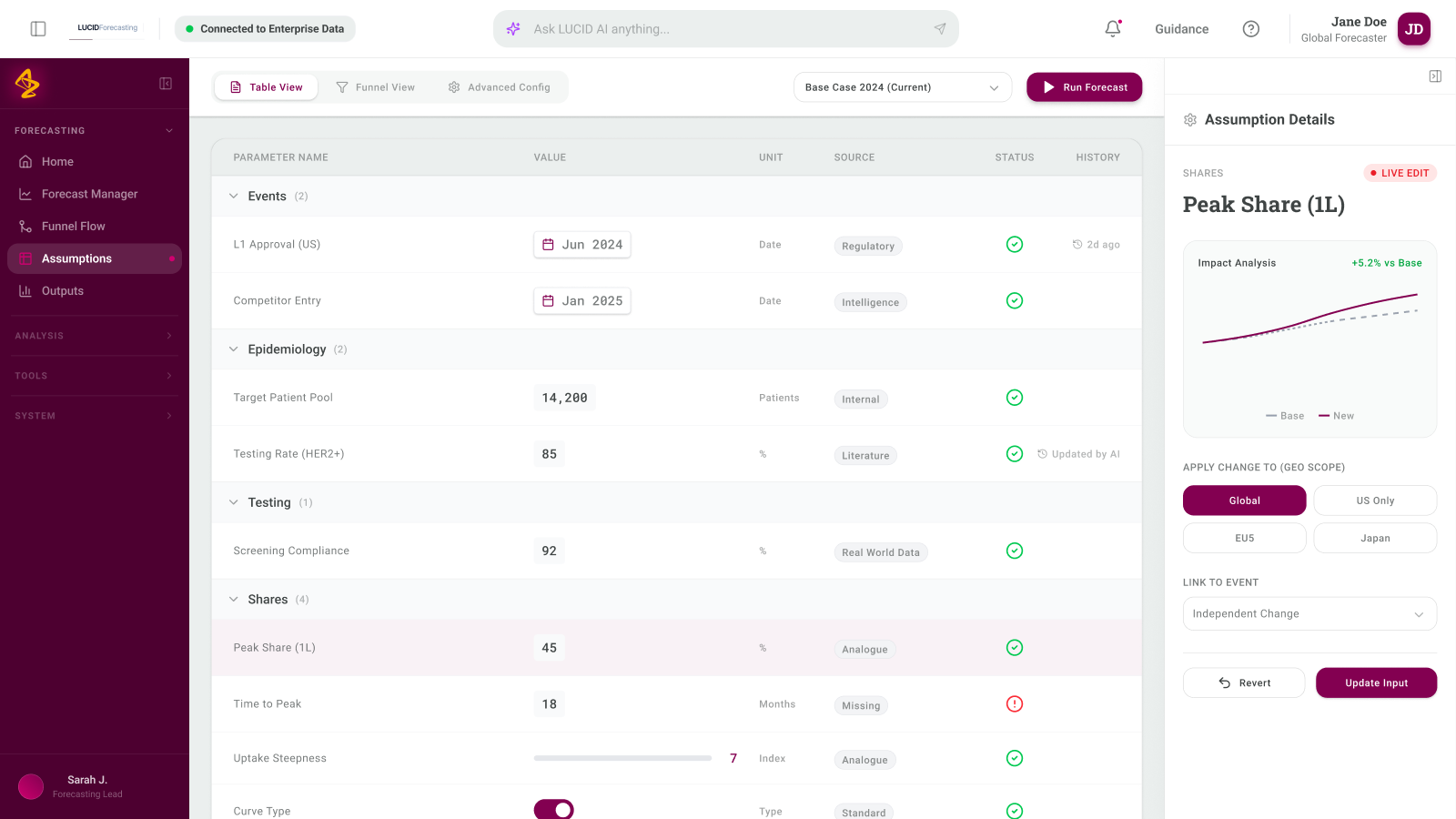
I designed the forecasting frontend. Domain colleagues supplied the model, and collaborators handled the Python integration. The reviewed walkthrough used mock inputs, with the AI layer inactive.
The assumptions workspace showed each input's value, unit, source, status, and history. A detail panel let someone inspect the assumption's scope and update it.
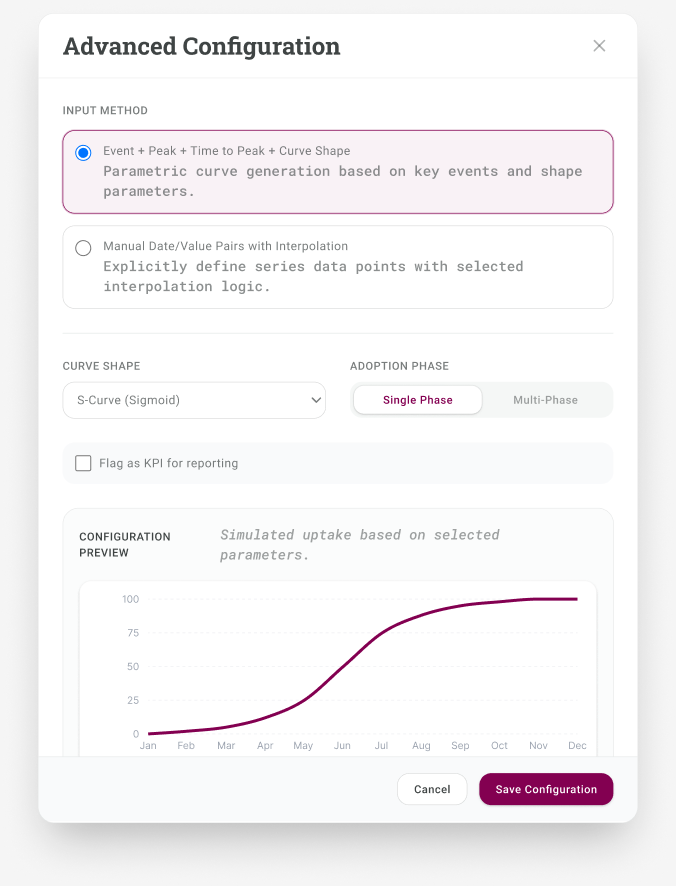
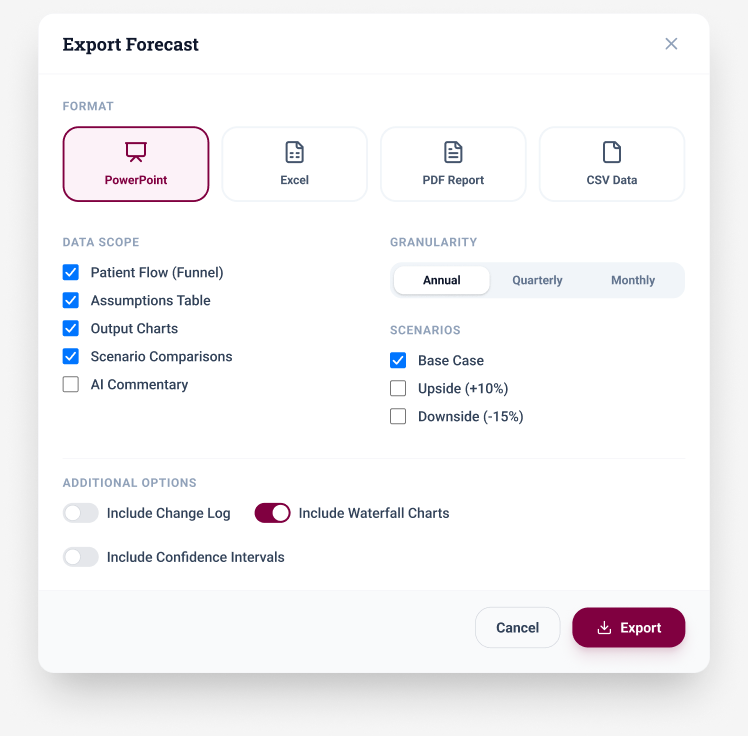
The configuration preview grouped input methods, curve shapes, and adoption phases. The export dialog offered format, data scope, granularity, scenario, and chart choices. Both used example data; model accuracy and the export service remained unverified.
Inspect assumptions, configuration, and output
Run the prototype to check the rest of the workflow
The assumptions screens were only part of what I designed. I ran the exported code bundle locally and captured the screens that carry the rest of the workflow: shaping the patient funnel, testing how much each input moves the answer, and assembling the report a forecast cycle has to produce.
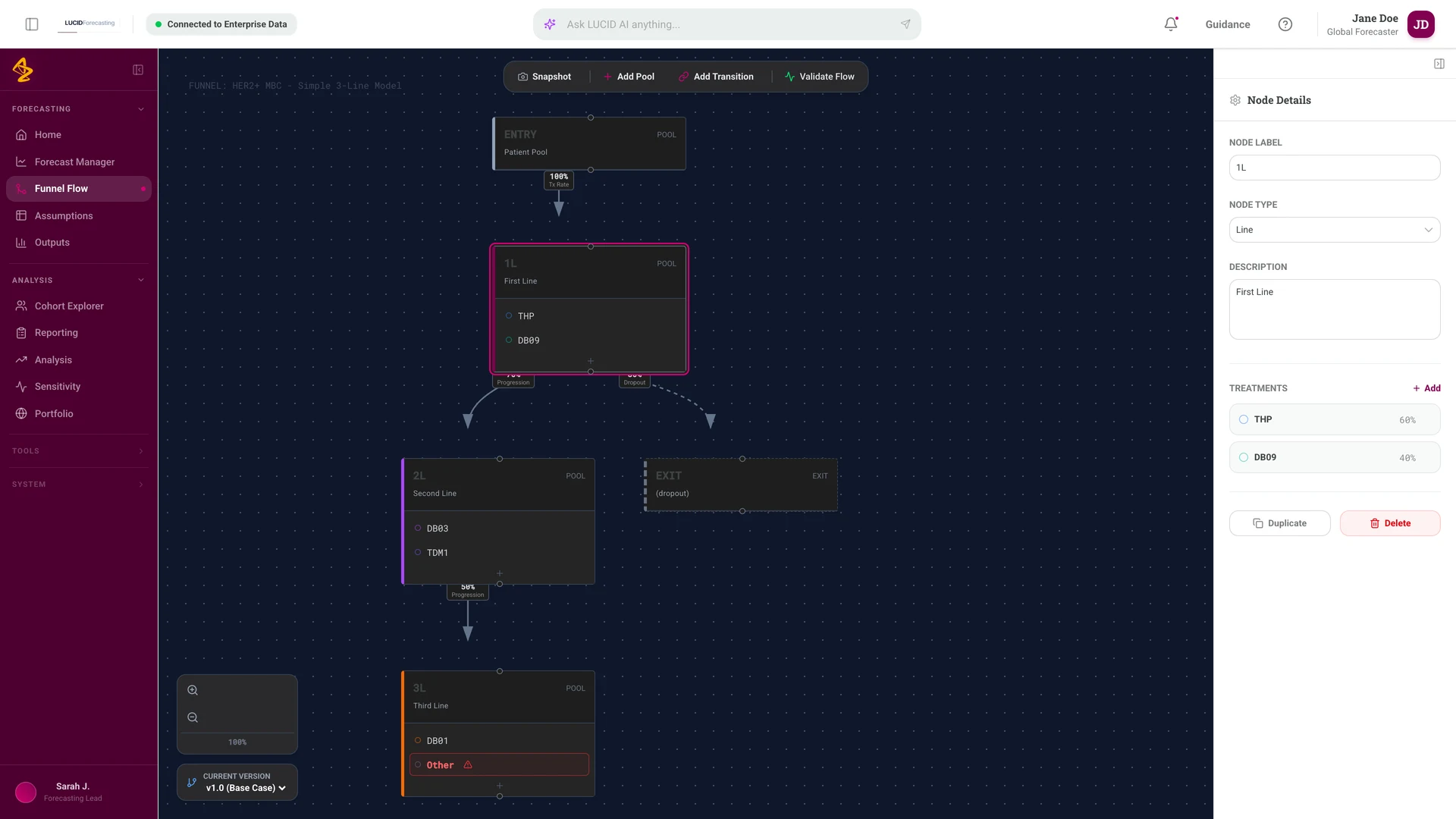
The funnel editor treats the patient flow as nodes I can edit rather than a fixed template. Selecting a pool opens its treatments and progression rates, so the structure and the numbers stay in the same view.
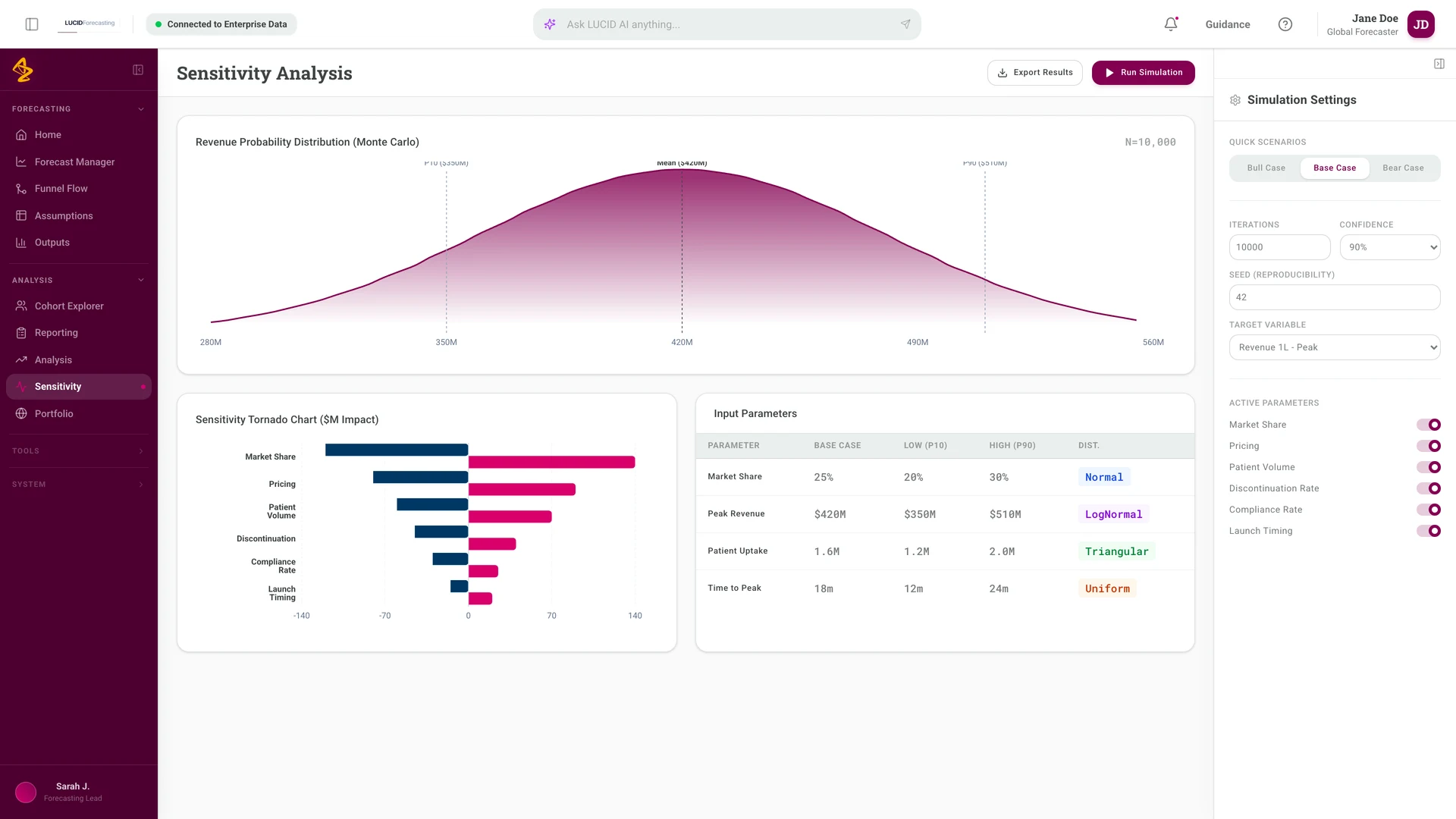
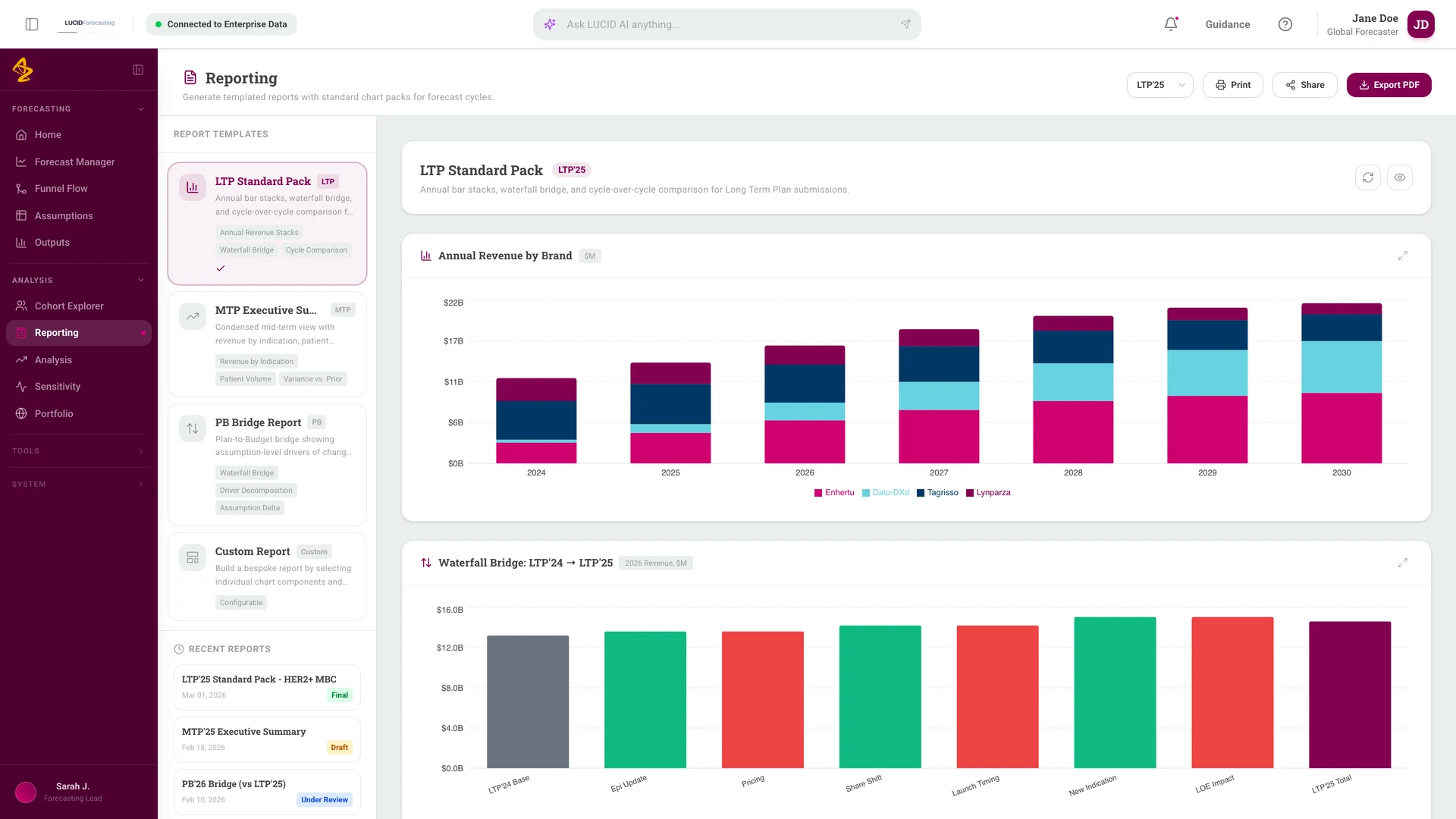
Sensitivity pairs a distribution with a tornado chart, which puts the ranking of inputs next to the spread of results. Reporting starts from named packs tied to a forecast cycle instead of an empty canvas.
Everything in these screens is local sample data defined in the prototype source. No model, simulation, or export service is connected behind them.
Screens captured from the running prototype
Brand planning: the first demo moved the target
The ask
A brand team had built a local retrieval tool with an AI assistant and wanted enterprise support for it. The team's requirements said brand leads spend days in meetings just working out which parts of the brand strategy plan need updating each cycle. That's their statement, not a measurement. The question I tested was whether grounded answers in visual formats, such as a funnel or a SWOT, would help a brand team plan faster.
How the first demo changed it
23 March 2026
The business sponsor approved the funnel view. He also proposed a weekly design approval meeting shared with a second brand team, so feedback arrived once instead of piecemeal.
16 April 2026
First demo, to a brand director and an insights lead. The brand director said SWOT wasn't critical at this point in the brand's life cycle and mattered more at launch. The insights lead said the first priority was "a very, very strong insights foundation".
20 April 2026
We prototyped an Insights Day pre-read builder around how the insights lead prepared his team. An engineer on the team deployed a live version the same day.
21 April 2026
At handoff the insights lead said he could bring parts of it into his existing Insights Day deck. He called it supplemental, something to use "if I'm missing something major".
22 April 2026
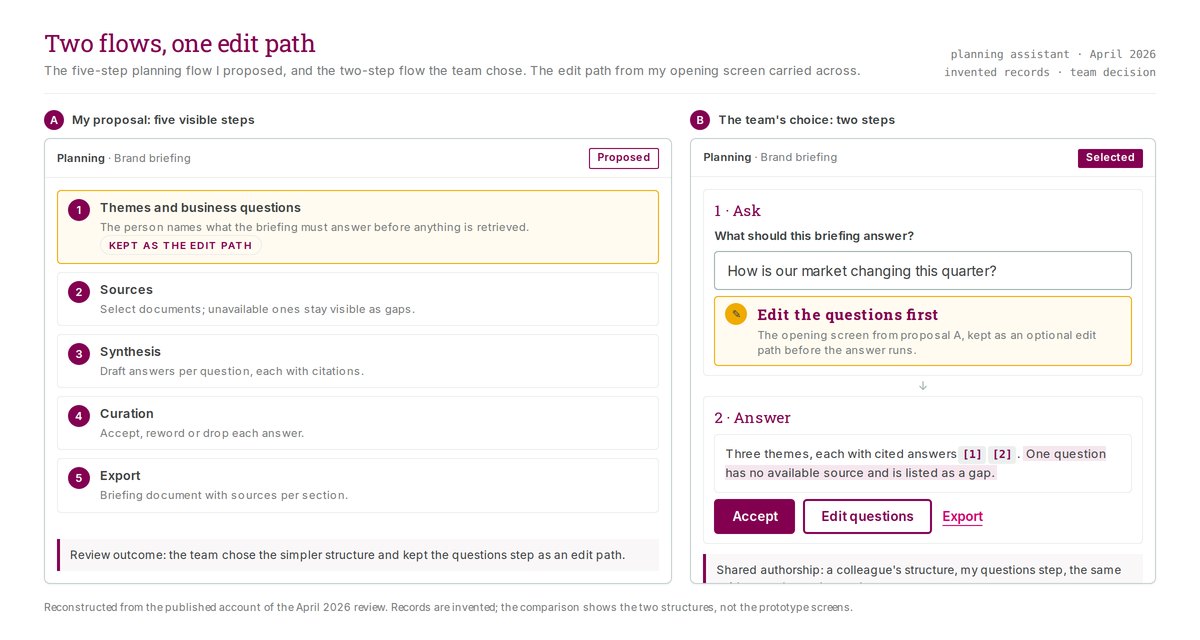
I had designed a five-step flow. An engineer proposed two: set the themes and questions, then run. I agreed on the spot. One of my steps was really a loading screen and another was an export button. The project lead approved it, and my first step stayed on as an optional edit.
27 April 2026
The brand lead said she'd like sales metrics on the dashboard, then ruled them out herself because the tool isn't meant to be another reporting dashboard. The sponsor agreed. Going to production needed a formal service request and AI governance sign-off.
Outcome: changed, and the scope held
The demo answered a better question than the one we brought. We had built for planning at launch, and this brand was past launch, so the next prototype followed what the insights lead did first. The result was modest and real. One user said he'd use it as a supplement. The scope call on 27 April was the brand lead's, and I think she got it right. A tool that also tried to be a sales dashboard would have lost the job it was good at.
Contribution
I designed the interface and built the prototype. Other people owned the agent's retrieval and training. An engineer held the production frontend and implemented approved changes.
What the demo moved

Design detail: answer formats
Chat was the wrong shape for the answer
Brand planning questions rarely have one-line answers. Someone wants to know where patients leave a treatment funnel, or what a competitor's move means for the plan. A paragraph of prose is a poor way to read either one.
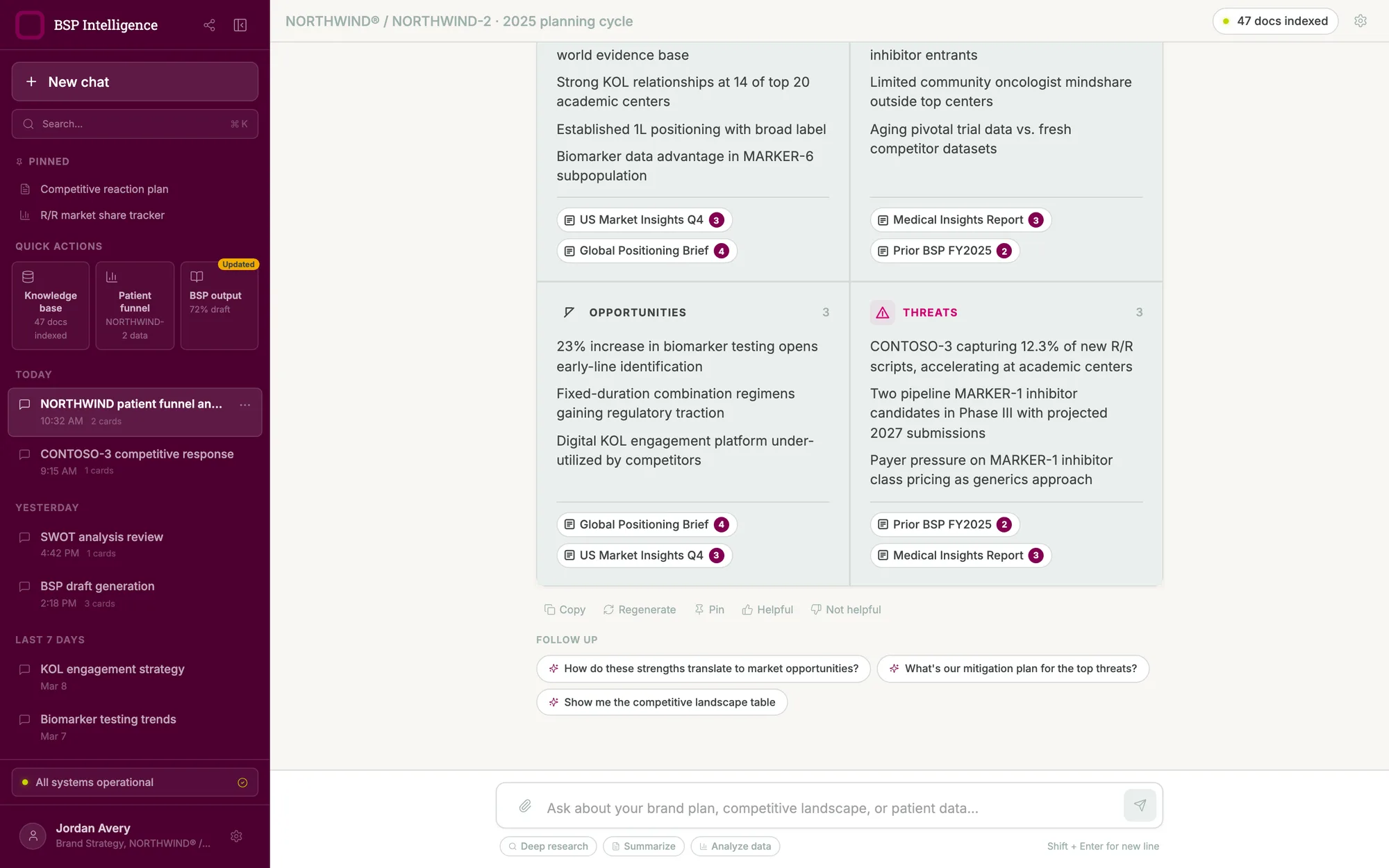
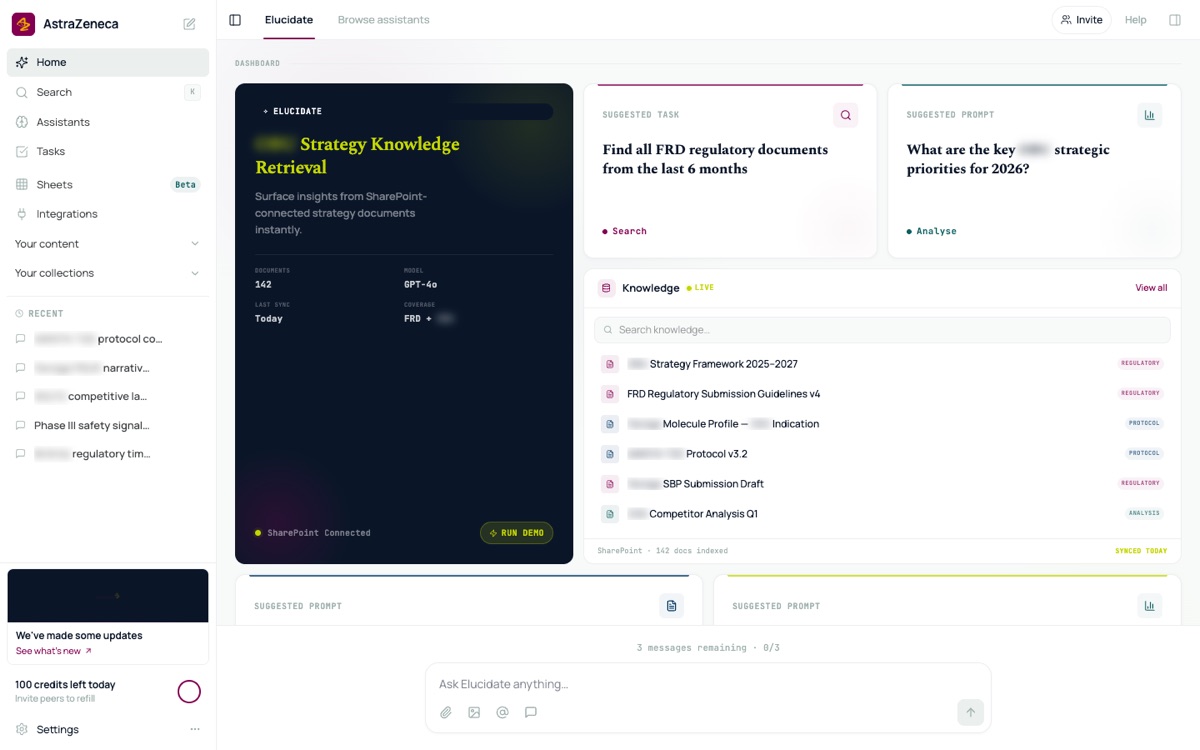
I designed the assistant to answer in the shape the question deserved. A funnel question returns a funnel. A competitive question returns a side-by-side read with the evidence set beside its implication. A request for the plan returns a draft with its completion state marked on it.
Catalogue the answer formats, then rank them
Rather than design one output and stretch it, I catalogued the formats a planning conversation actually needs and numbered them, then ranked them by how much each one mattered. A strategic ambition timeline and a core insights stack came first. A competitor teardown and a competitive landscape table came next. A numbered agenda for multi-topic questions sat near the bottom. Ranking the formats made the build order a decision rather than a guess.
Make it fast for someone who lives in it
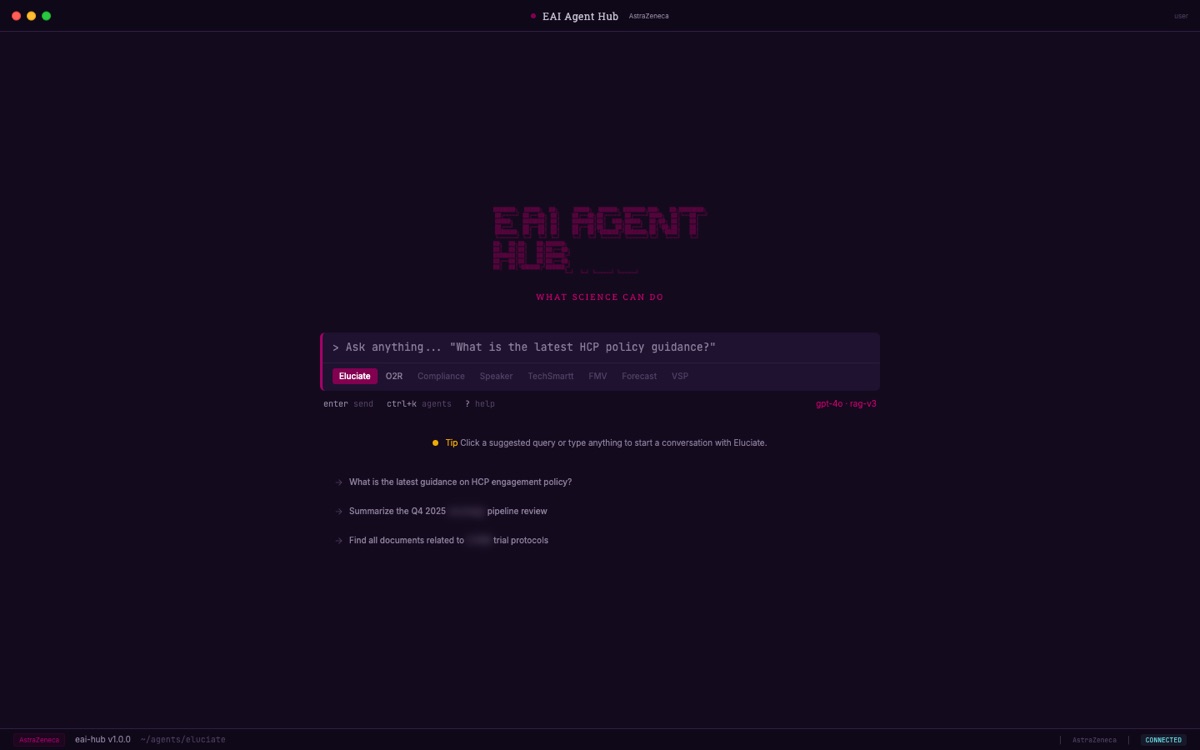
The prototype has a command palette, a sidebar that collapses, a shortcut for starting a new conversation, and a shortcuts overlay behind the question-mark key. A knowledge-base view lists what the assistant has indexed. A source panel opens beside an answer so someone can check what it drew on before trusting it.
Scope
This is a prototype. It shows the interface and the intended behavior, not a released application, adoption, or a measured result.
Where a planning session starts
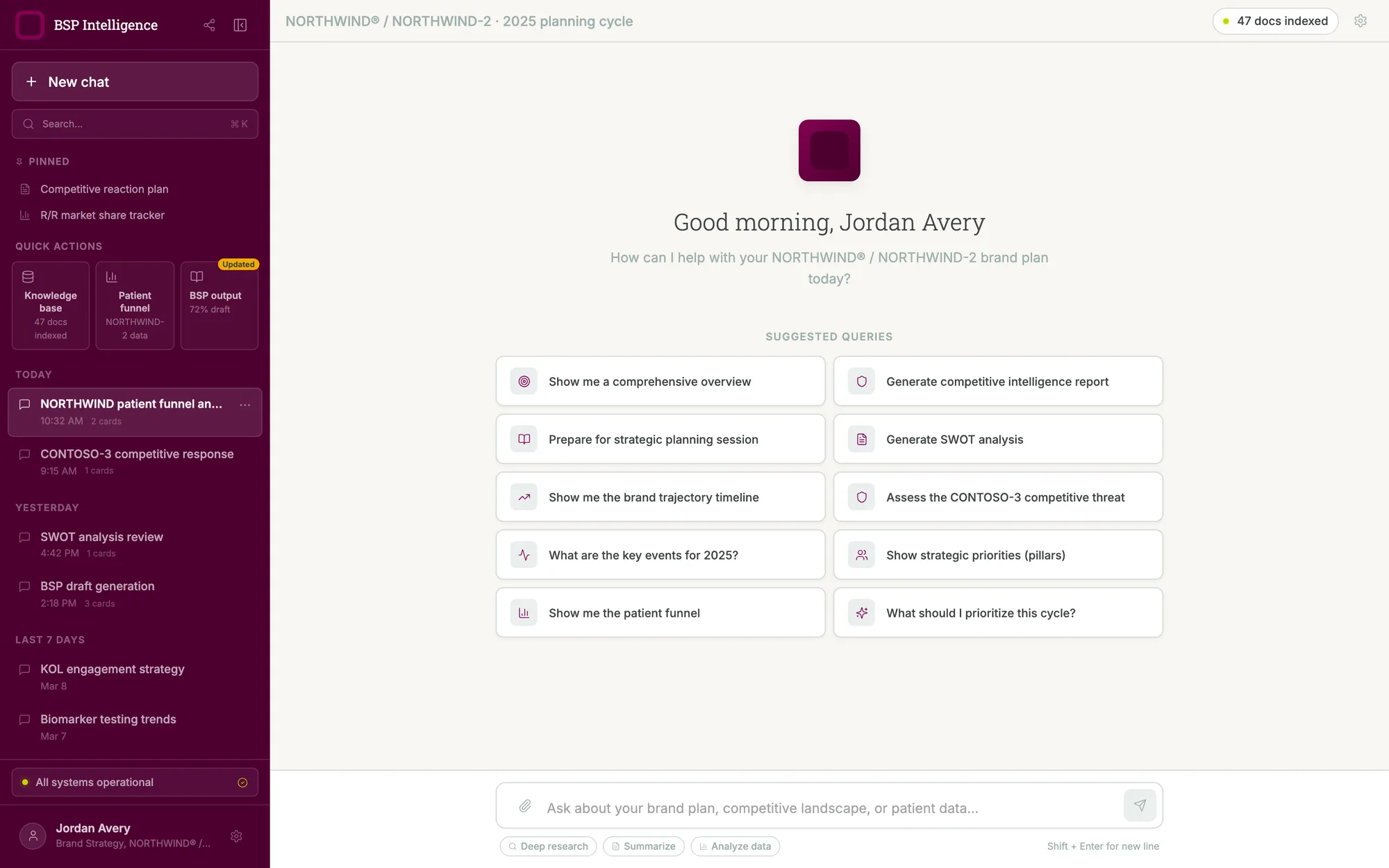
A funnel question returns a funnel
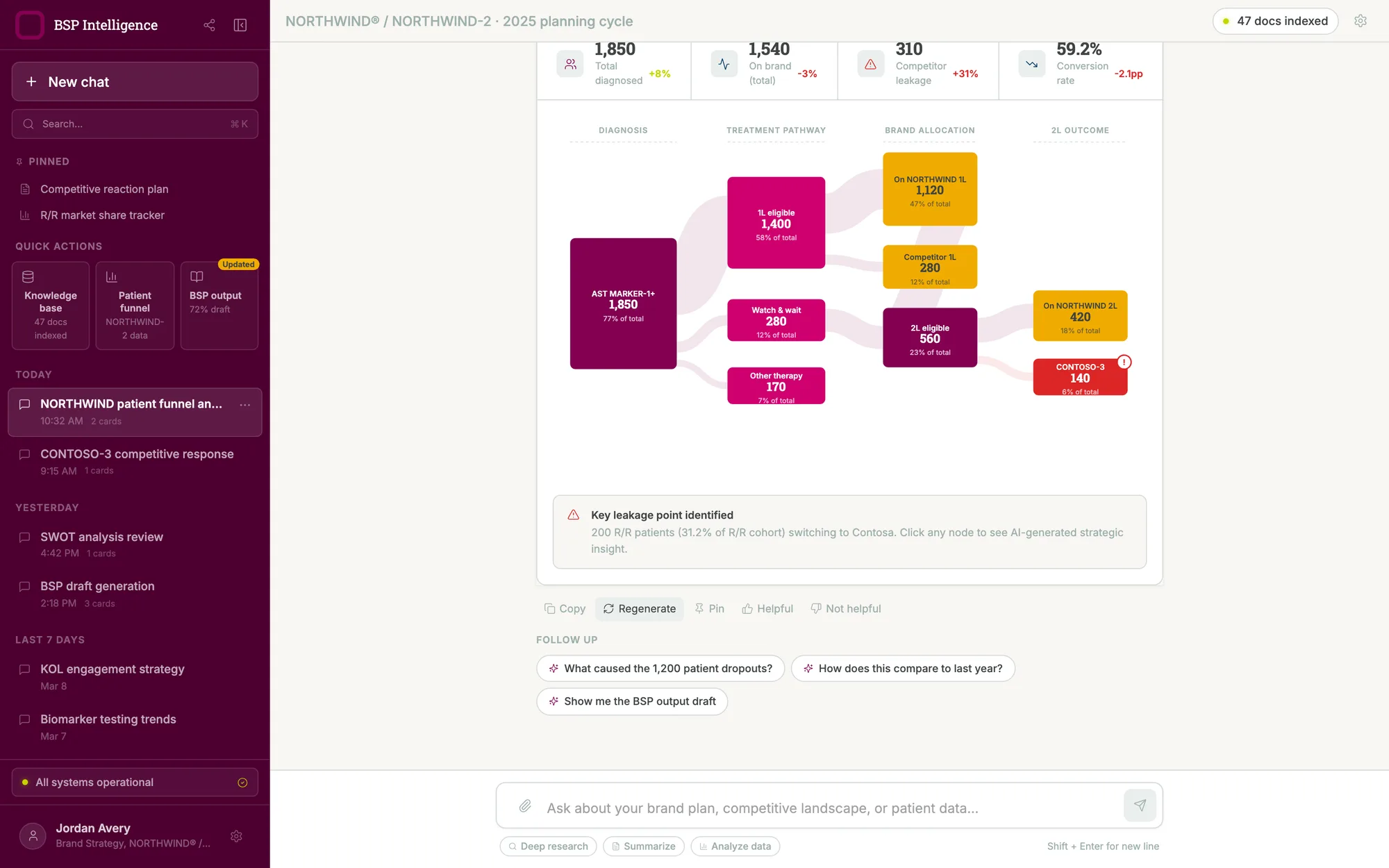
Where a planning question starts
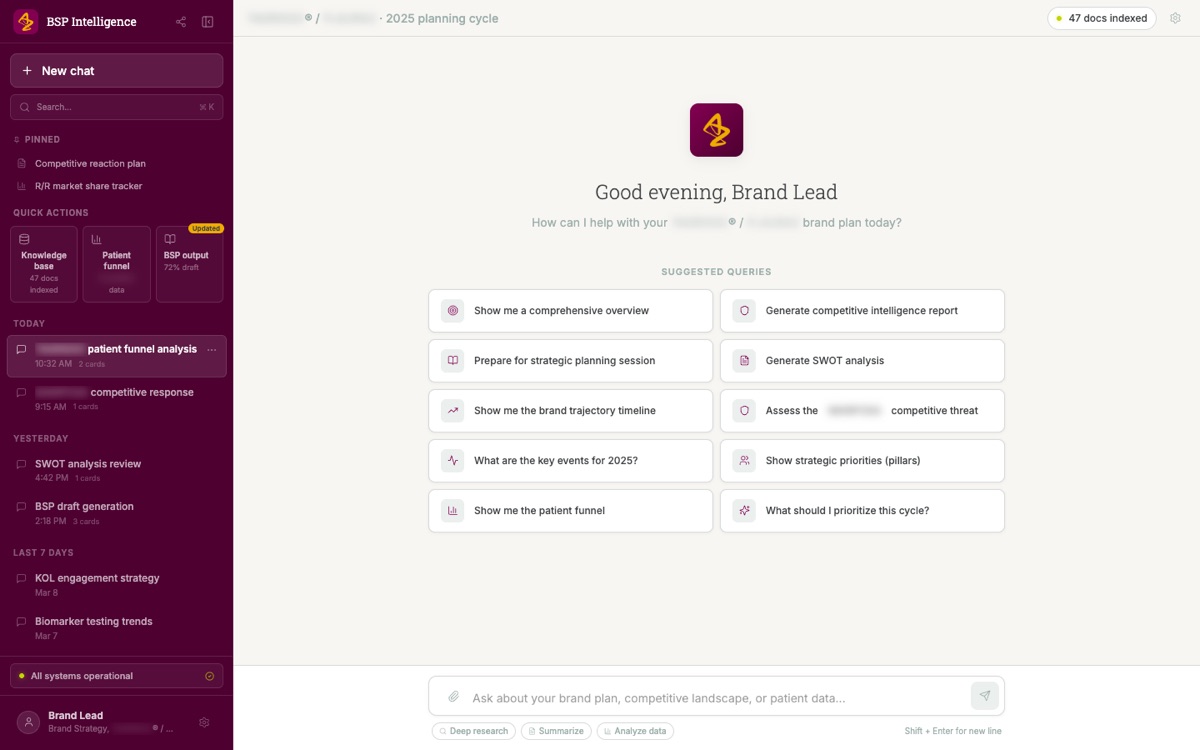
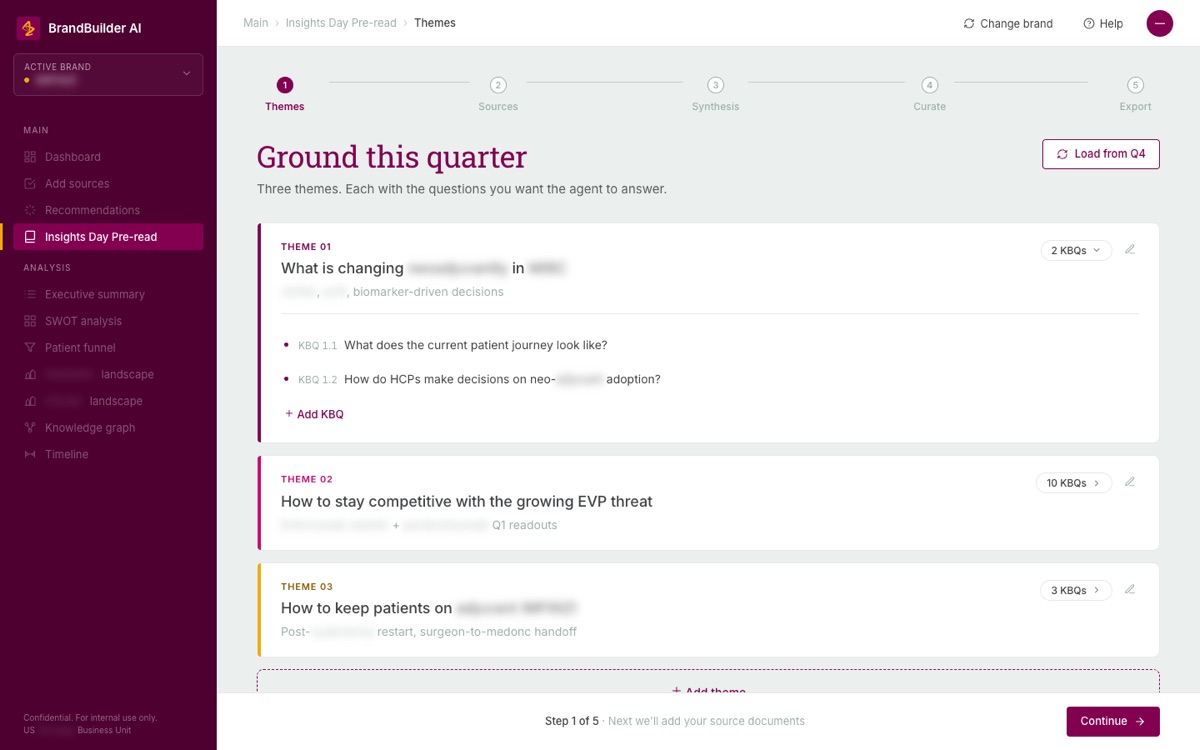
What the corpus holds, and the structure the team chose instead
Shared assistant shell: design, then a feasibility call
One front door, tested in rounds
Teams across the business unit were each building their own assistant, and each one looked and worked differently. I prototyped one shell they could share: a directory of assistants, a landing page for each, and one conversation view with its sources in sight.
Design, then let engineers decide what's buildable
On 8 April we agreed how the work would run. I would do another round of the interface on a senior leader's feedback. Then the engineers would decide how much of it could be built, in a feasibility session I was asked to set up. Earlier, an engineer had asked for my code once I'd applied a leader's feedback, so he could start implementing from it. On 16 April my manager said the aim was an updated version with some connectors working within two to three weeks. That was a target. On 28 April a team lead said the shell had been folded into the US Oncology head's own agent, and told me to close it.
Scope
This is a prototype. The retrieval it depicts wasn't connected to a live service, and no release or measured result is claimed.
A field sales assistant: writing the requirements while they moved
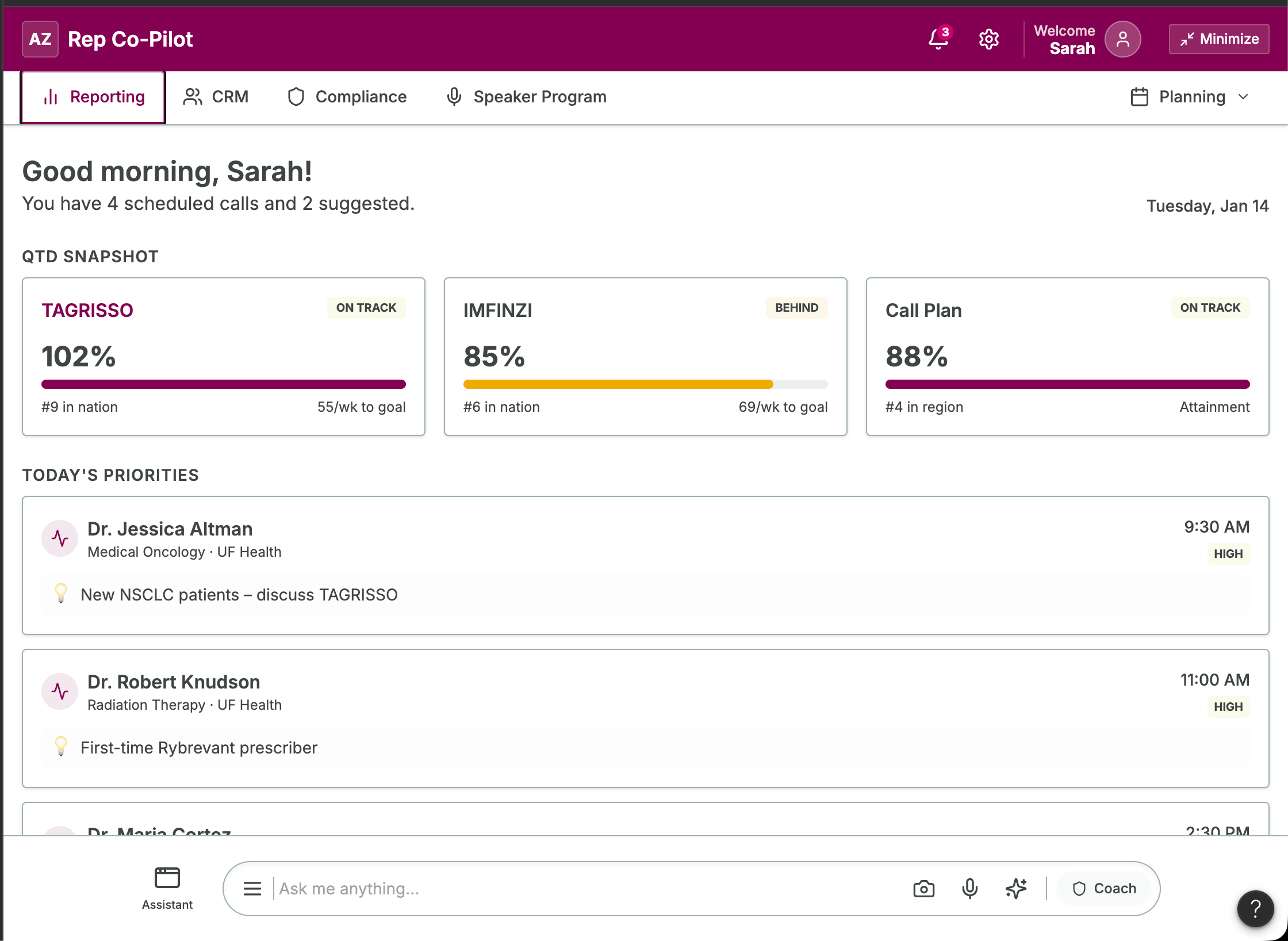
In January 2026 a senior commercial leader wanted one place where field reps could start their day. Reporting, customer records, speaker programs and data-change requests each lived in a different tool. I was the named author of the requirements document and built two prototypes in a week.
The requirements kept moving, so I logged each change with its date in the document: nine entries from 13 to 19 January. The biggest came on 15 January, when the leader moved the design from three panels to cards. I also wrote down what waited for a later phase, such as editing customer records and offline use. The risk table named fast-changing requirements, with change control as the fix. Because the assistant would give coaching on compliant conversations, it also called for human review and clear disclaimers.
A new version went to the business on 16 January. Final sign-off was waiting on a bug fix and one missing view. I have no record of a build after that.
Design detail: the shell and assistant configuration
Every assistant arrived as its own product
Teams across the business unit were building their own assistants. Each one came with its own layout, its own idea of where sources belong, and its own chrome. Anyone who used two of them had to learn two products.
I designed a single shell they could share. A directory where someone browses the available assistants and sees what each one does. A landing page for an assistant that states its capabilities and offers starting prompts before the person commits to a conversation. Then a conversation view that reads the same way whichever assistant they opened.
Say where the knowledge came from, and keep saying it
In this setting provenance is the trust. I put a persistent status bar under the header showing whether the connected document source is reachable, when it last synced, and the knowledge cutoff date. It reads like an instrument panel on purpose, set in a monospace face, because it reports machine state rather than speaking to the reader. A stale source matters when the answer feeds regulated work, and the interface should say so before someone discovers it later.
Make citations clickable and sources selectable
Answers carry numbered citation anchors, and selecting one highlights the matching entry in the source sidebar. A source panel lets someone include or exclude what the assistant draws from before asking. The answer arrives in three phases, a skeleton, then streaming text, then the resolved response with its citations attached, so the wait shows progress instead of a spinner.
One directory for every assistant
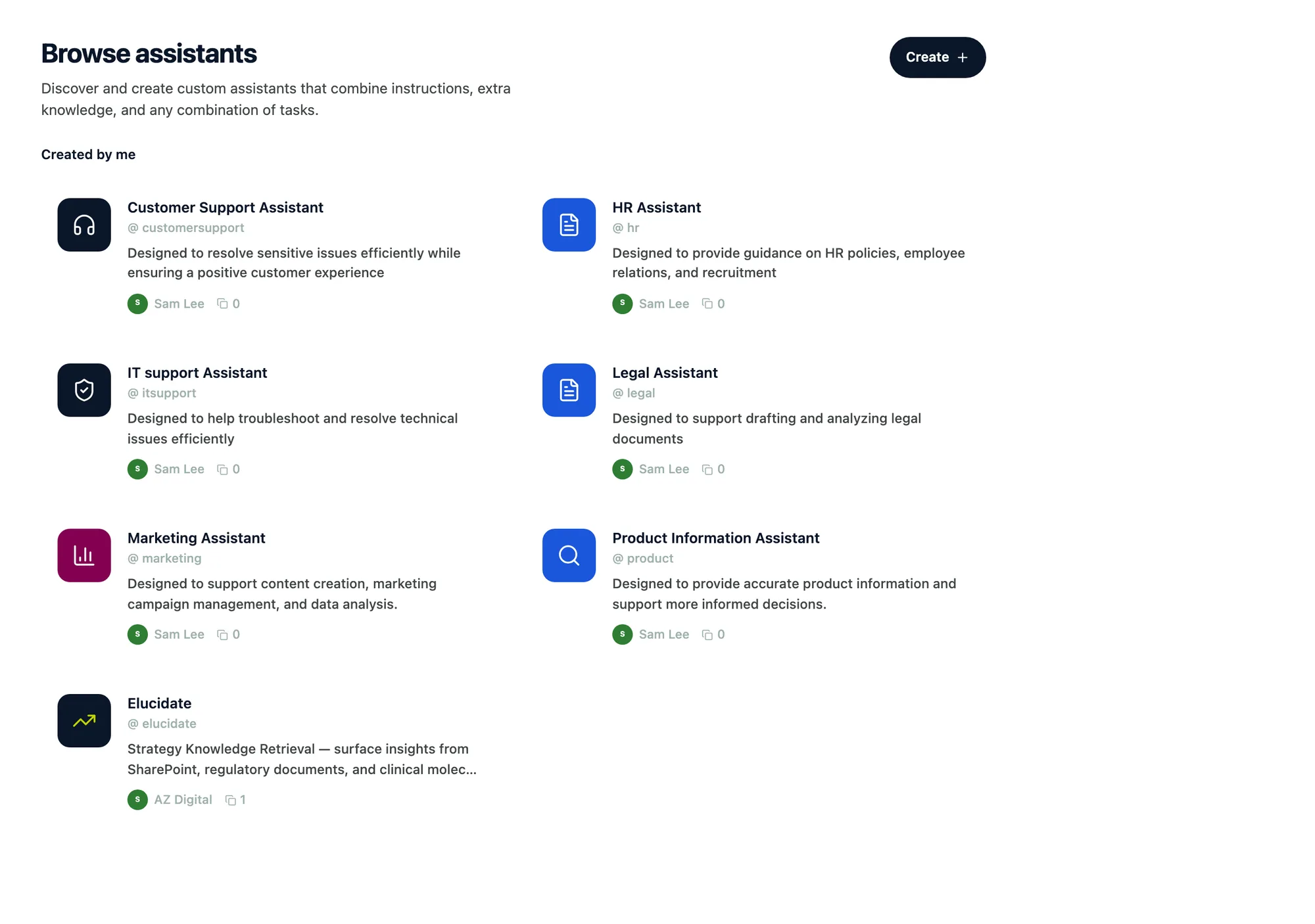
The shared home, and a keyboard-first version of it
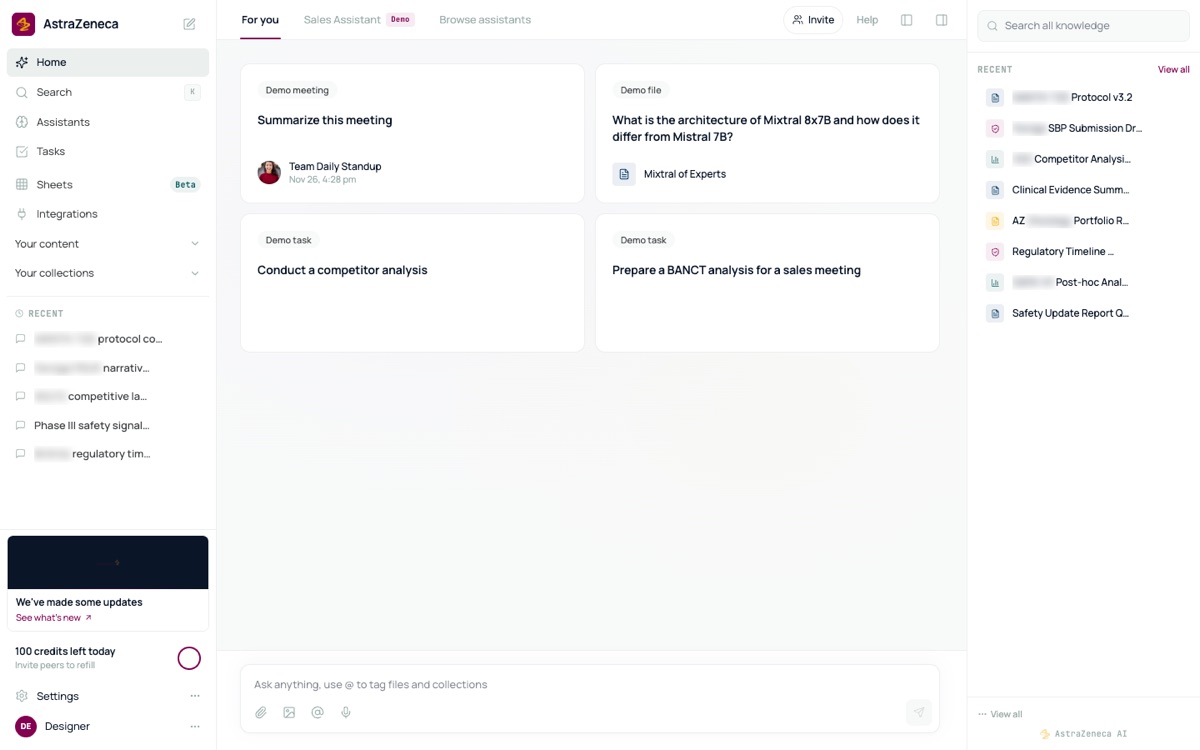
The same door for a reviewer and for a field team
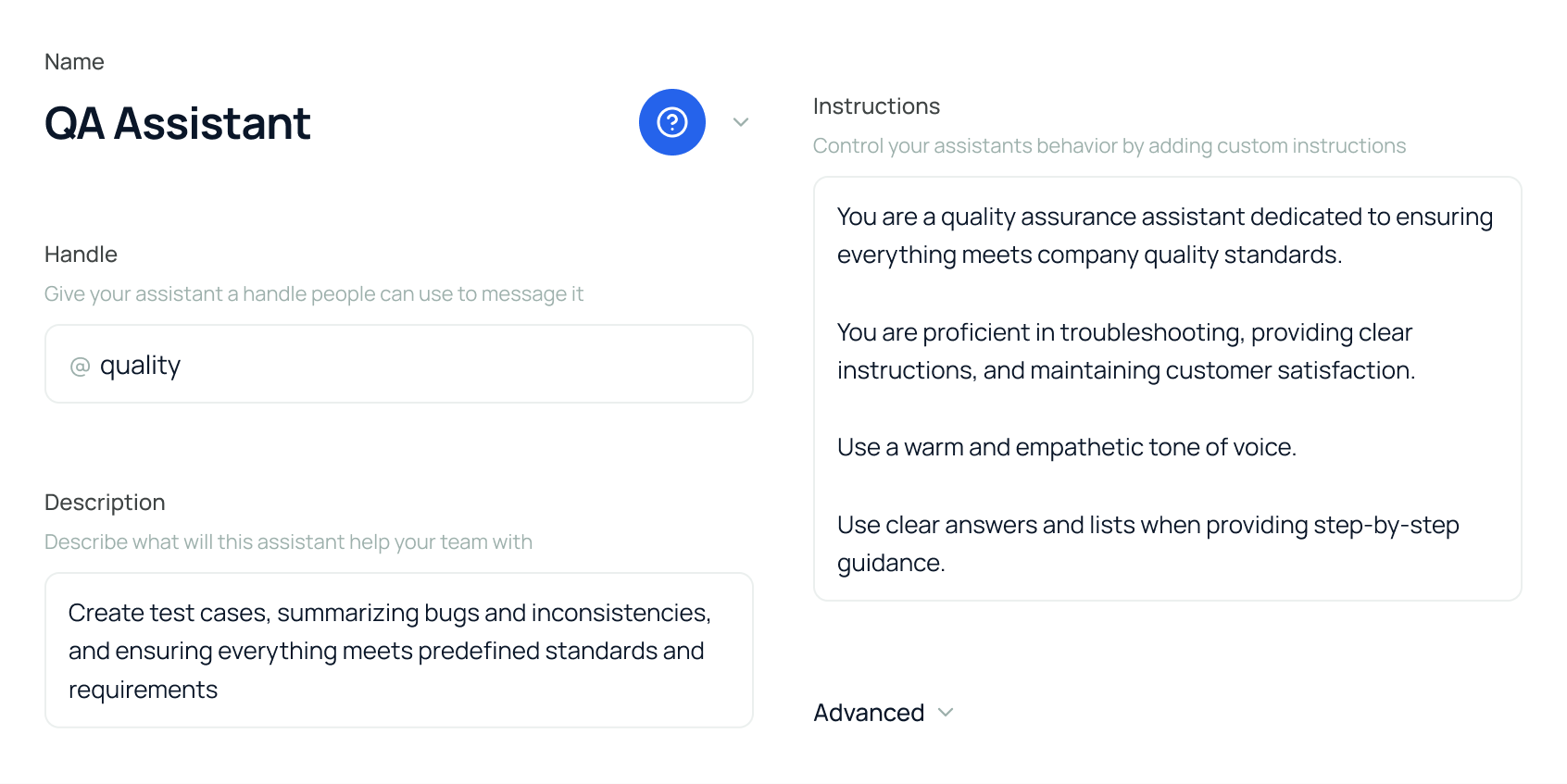
Make an assistant's configuration visible
Every prototype, with its outcome
The rest of the set
Not every prototype got a story, and several never got an outcome. Here is each one with the question it tested and what happened to it. Where the record is silent, the table says so.
Outcomes on record

The table as text
Forecasting workflow. Would a clickable workflow line up stakeholders and funding? Handed off. Non-AI core to a capabilities team. AI layer deferred.
Brand-planning assistant. Would answers in visual formats help a brand team plan? Changed. Refocused on insights after the first demo.
Insights Day pre-read. Could the tool prepare the team's Insights Day? Kept. As a supplement, by one user.
Shared assistant shell. Could one front door serve many teams' assistants? Handed off. An engineer asked for the code to start from. In late April it was folded into the US Oncology head's own agent.
Field sales assistant. Could one screen give field reps a single place to start? Waiting for approval. I wrote the requirements. Still waiting for business sign-off in January 2026. No build on record.
Commercial document search. Would a planned, cited search of commercial documents help? Handed off. An engineer asked for the code as a build baseline. The Sankey view was dropped after team feedback.
Fair-market-value lookup. Could reviewers see why the agent classified a speaker's specialty? See other part. Covered in the design system part.
Hematology tutor. Would the business want a second design beside the vendor's? Second option. Which one they chose isn't recorded.
Risk-register chatbot (3 files). Would conversational intake work for risk records? Deferred. Put off in October 2025 so data entry could ship first.
Policy exception review. Could exceptions run as their own workflow? See other part. Covered in the compliance part.
Conference app and admin. Would one onboarding question make a schedule personal? Handed off. Handed to the delivery team to build in December 2025. Launch not on record.
Research governance assistants. Would task-first assistants help route proposals? Parked. Paused in April 2026. Back in May on the Workbench.
Terminology lookup. Would one lookup with aliases settle terms? Parked. Archived in April 2026. Not a business priority then.
Keyboard-first assistant. Would a command-line style hub speed up switching? No recorded outcome.
Portal variants (5) and content-discovery variants (10). More governance detail or less? Analytics or none? Narrowed. Who decided isn't recorded.
Voice-to-slide authoring. Can someone draft slides by talking? No recorded outcome.
Design detail: commercial document search
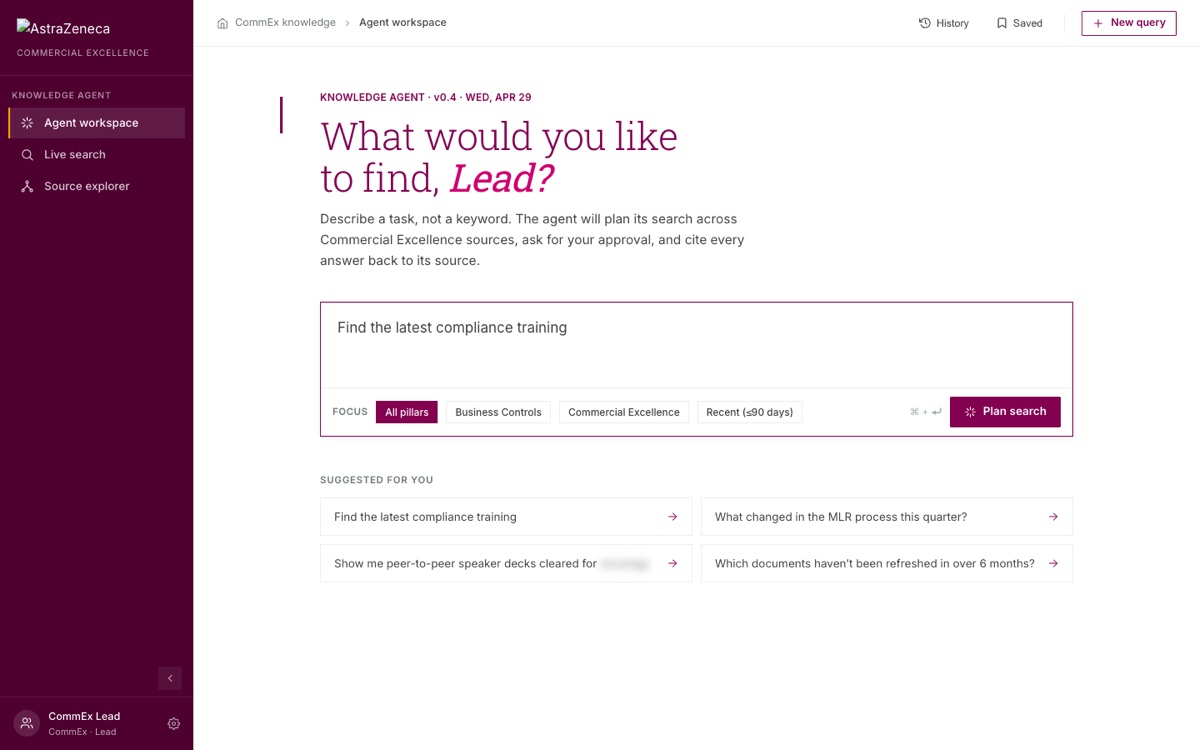
The search asks for a task, shows its plan before it runs, and cites every answer. An engineer on the brand team asked me to add one more view to my prototype and send him a new bundle to use as his build baseline. The team liked the search but not the Sankey view of the document set, so we dropped it.
Plan the search, then cite the answer
Design detail: conference app
Most of a conference schedule is irrelevant to any one person
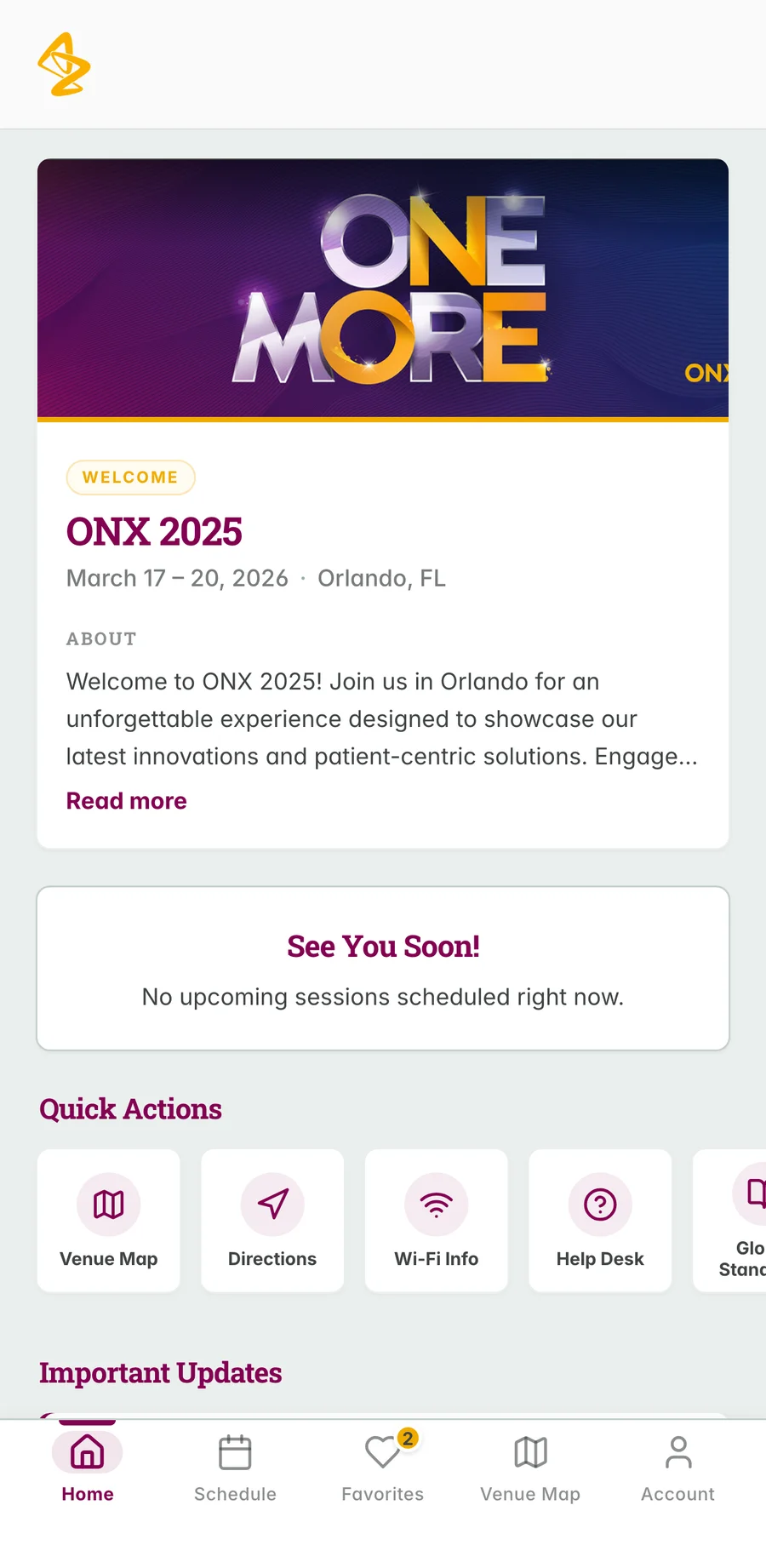
An internal oncology conference needed an app for the people attending it. The schedule was large, and most of it did not apply to any individual attendee.
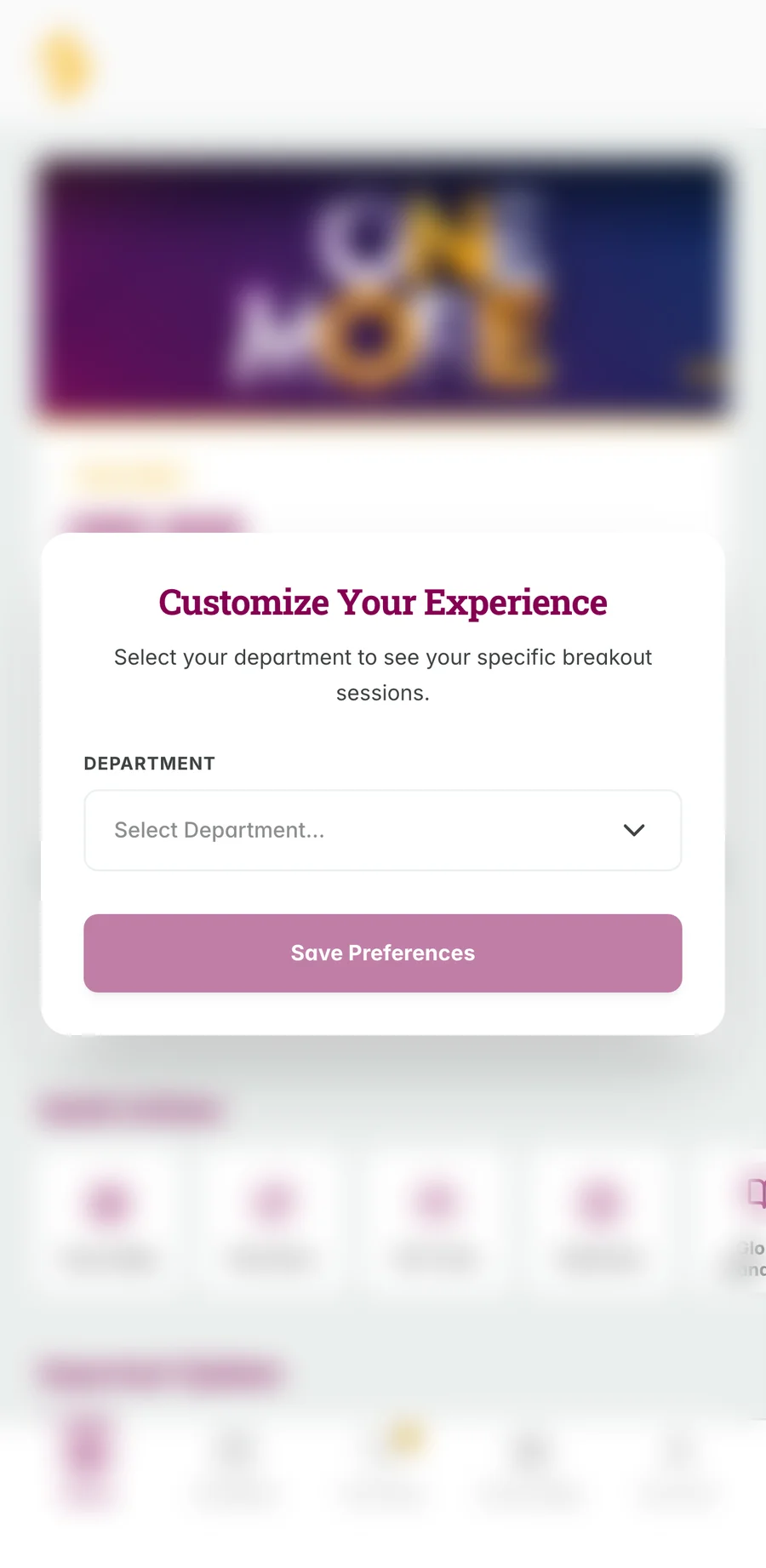
Onboarding asks which team the person works on. That single answer shapes everything afterwards. Sessions relevant to their team come forward, and they can mark interests to assemble their own schedule. A map view handles the part of any conference nobody enjoys, which is finding the room.
Ask one question at onboarding, then actually use the answer
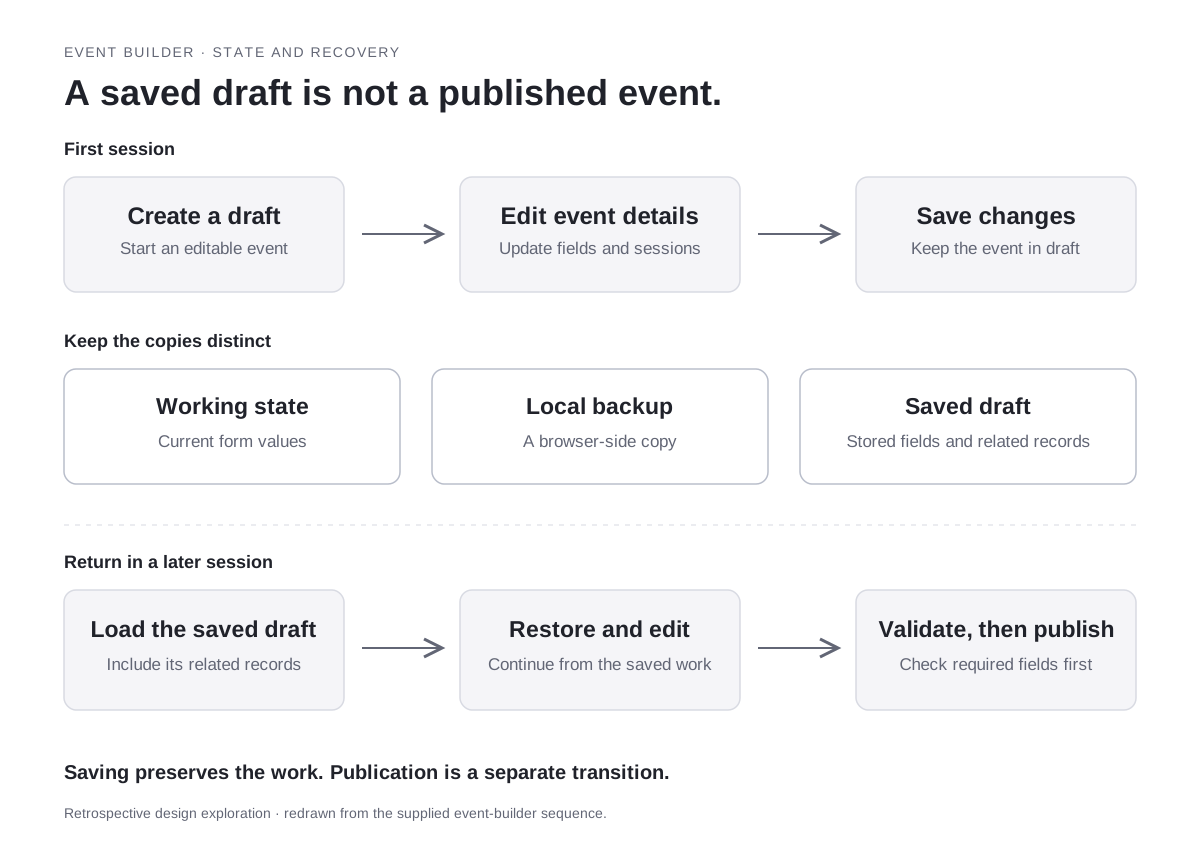
Event apps often collect preferences and then ignore them. I kept onboarding to the single question that changes the rest of the product, and let people revise it later from their account. The schedule, the interest list, and the session detail all read from that one answer. A companion admin dashboard covers the organizers' side of running the event.
Scope
This is a prototype built with sample programme data. No attendance, engagement, or release result is claimed.
The one question, and what it changes
The organisers' side, and what a draft actually is

Design detail: research governance assistants
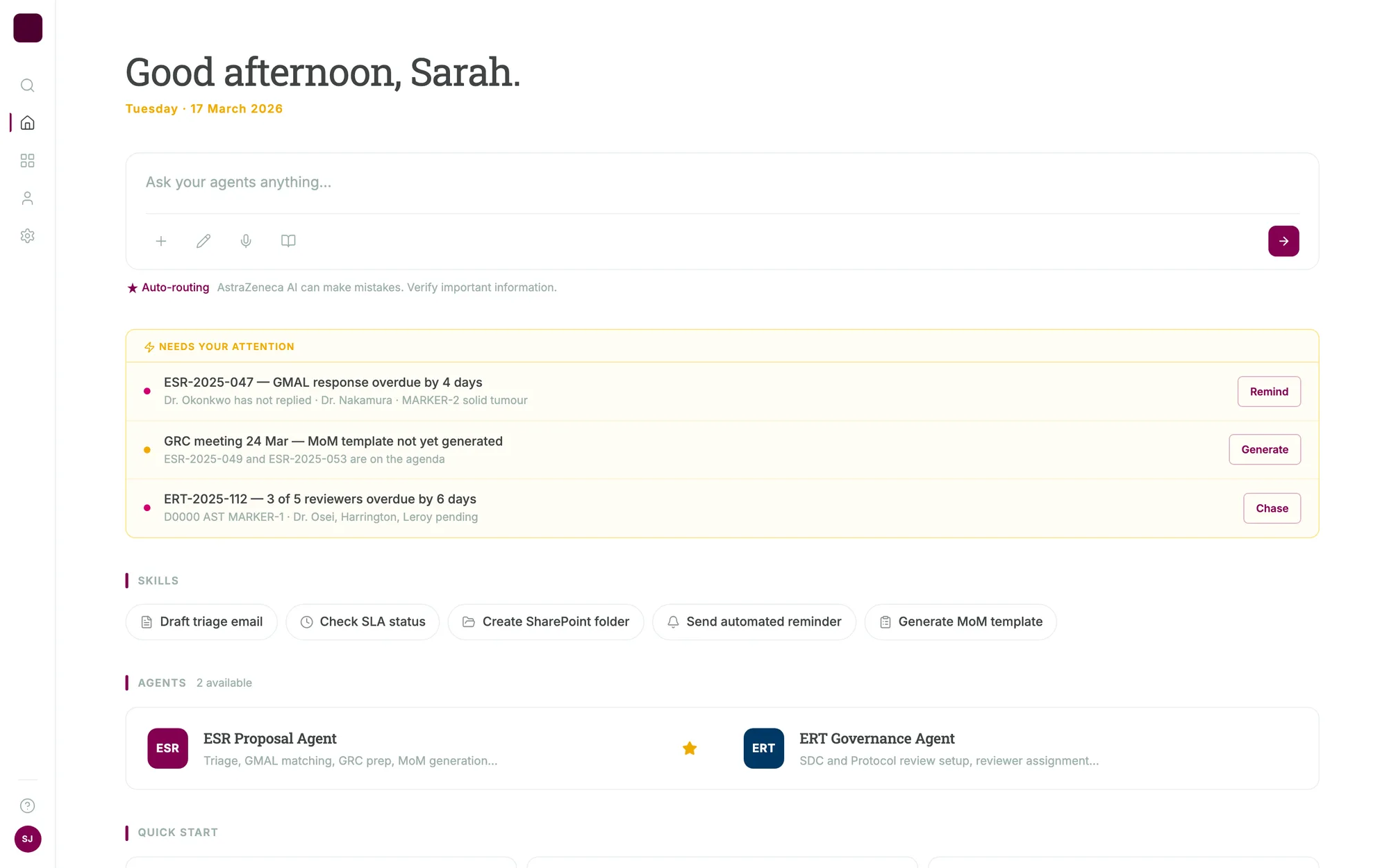
The work is routing, chasing, and writing it up
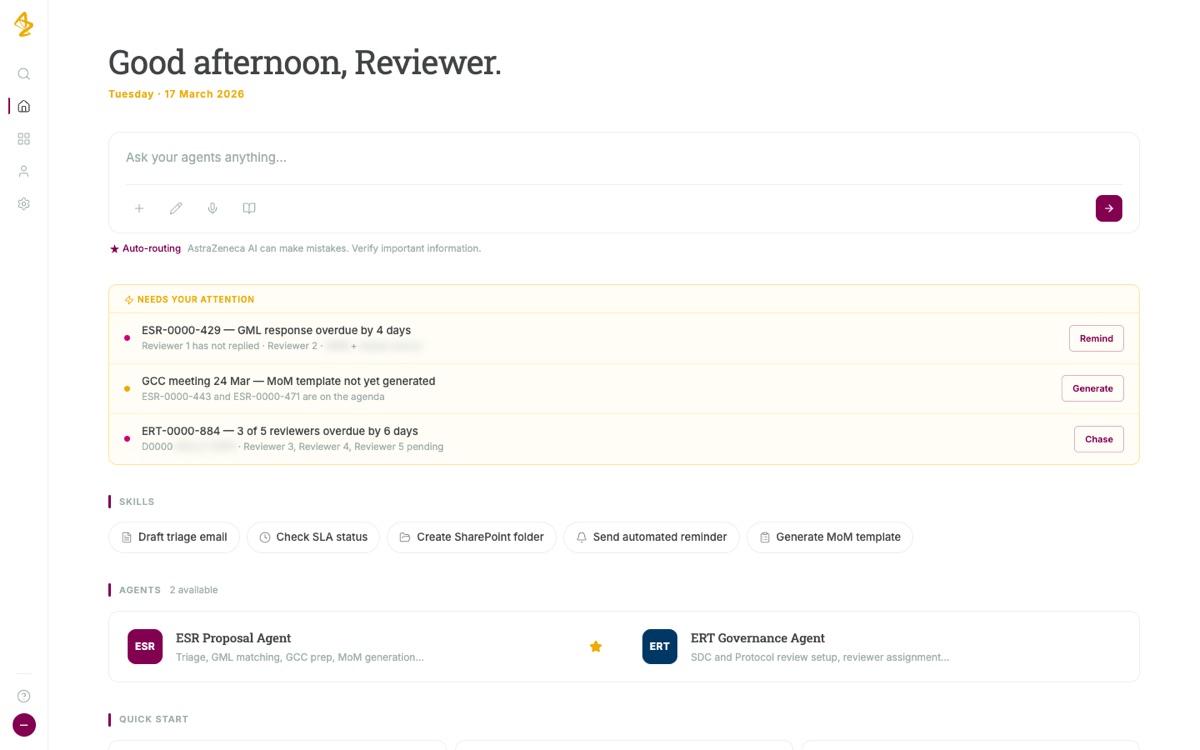
Externally sponsored research proposals move through a review committee on a clock. Someone has to route each new proposal to the right medical lead, keep the pipeline visible, prepare the committee's papers, chase reviewers who have gone quiet, and write up the decision at the end.
I designed two assistants for that work, one for the proposal pipeline and one for the review governance. Both open on concrete starting tasks rather than an empty box. Show what is active and where it stands. Triage a new proposal. Draft the minutes for the next committee meeting. Name the proposals at risk of missing their deadline.
Give every answer its next action
A status answer that ends in a status is only half useful. Each response carries the actions that follow from it, sending the reminder, generating the minutes, exporting the list, so someone can finish the task in the place where they asked the question.
Scope
This is a prototype populated with sample records. It shows the proposed interface and task flow, not a released system or a measured improvement in review time.
Open on what needs attention
The whole year on record
Month by month
Aug to Sep 2025 · Getting started
I started on the Compliance risk register in August 2025, and the project held its kickoff in September. By late September I had started my first Figma files: a content-search tool and a chatbot idea for the register.
16 Oct 2025 · Build the data entry first
At the risk register's cost meeting, the group chose to build data entry first and leave a chatbot for later.
Oct 2025 · Three more requests
The requirements for a breast-cancer field hub named me for its screens, site structure and test scenarios. I handed screens for a content-search prototype to an engineer, and I started a study-document checker.
Nov 2025 · Two sets of requirements
On 14 November I wrote version 1.0 of the risk register's requirements spec. I also co-wrote the document checker's requirements, versions 1.0 and 1.1.
Dec 2025 · Wireframes and standards
The business owner approved my low-detail risk register wireframes. I showed my first rules for AI assistants, and my manager asked me to start from the people who use them. I joined the conference app team and handed its designs to the builders.
7 Jan 2026 · A document checker that works
I showed the checker flagging missing study files in a mock copy of the folders. The business asked for private alerts to the study lead instead of a shared channel.
13 to 19 Jan 2026 · Field sales assistant
I wrote the requirements for a field sales assistant, versions 1.0 to 1.2, and built its first prototype.
Feb 2026 · Testing and a front door
Before testing, I got the detailed risk register screens approved and set up the test plan and bug process. Then I coordinated four days of business testing and recorded every decision. I handed the document checker to an engineer, reviewed other companies' cell- therapy websites for a new portal, and started the forecasting prototype. On 27 February I wrote the requirements for one front door to every assistant.
Mar 2026 · Launch month
The risk register's first phase went live. I built the shared assistant shell's front end while engineers owned its back end. I also started prototypes for brand planning, business- rule changes, safety-report review, a terminology lookup and a leader's companion agent, and I rebuilt a market-research app's screens in React.
1 Apr 2026 · One priority order
The IT leads ranked all my requests in one order, with the risk register first. New requests went through them.
Apr 2026 · Handoffs
I handed the forecasting prototype to an enterprise AI team on 17 April. My search prototype became an engineer's build baseline, and the team cut its flow chart for a simpler, metadata-first start. At a standup we chose an engineer's two-step brand-planning flow over my five steps.
Apr 2026 · Phase 2 and more prototypes
I wrote sixteen versions of the risk register spec in April, while we scoped Phase 2. On 23 April I walked the business owner through the Phase 2 scope and a policy-exception mockup, which waited on the compliance committee. I also built a hematology tutor and a fair-market-value review, and the project leads planned to back my tutor design with the business.
May 2026 · The AI Workbench
My manager asked me to hand the risk register to a colleague and spend almost all my time on the Global Medical Affairs AI Workbench. I built a view that shows an AI run's plan and steps, wrote a pilot checklist for a customer-experience console, joined the budget-planning kickoff, and set the design system's rule for brand conflicts.
Jun 2026 · One prototype becomes six
I took the lead on the medical-content use case. My manager asked me to split the shared prototype into one version per use case, and to run the writing-assistant comparison as a project. On 22 June the program sponsor said the work was too slow and the interface too cluttered, and the July demo narrowed to two use cases. By 1 July I had built a second budget-phasing prototype and a study-review chat with a queue for exceptions, and some of my slides went into the leadership deck.
Jul 2026 · The leadership session
The team moved to medical use cases only. An engineer connected my interface to the back end, and I wrote the session's requirements (45 user stories). Others presented. Afterward I was asked to design the slide builder inside a new content pilot, and I built evidence- planning screens and a workshop pilot on sample data.
Jul 2026 · Parts everyone could reuse
I told my lead I was writing down a shared design system and raised that the team had no front-end engineer. In late July I matched each slide-builder screen to its user story for a senior leader's review.
Aug 2026 · The slide builder
I rebuilt the slide builder as a web prototype and swapped its translation feature for voice. Voice could start a slide, but it could never approve one. Medical-training specialists walked through it with me. When a teammate's simpler voice prototype was ready, we agreed it would go first and mine second.
Aug 2026 · Handoff
A new designer joined, and I gave the Workbench tour and shared the voice and slide work. I moved my files to a shared place and added the design system's token files. My work ended in August 2026.
Smaller projects, with what I did on each
A breast-cancer field hub, October to November 2025. A franchise team wanted one SharePoint site where reps could find launch materials, events and training. The requirements document lists me as the UX/UI product manager, responsible for the site structure, the Figma screens and the test scenarios. I don't know whether it launched.
A study-document checker, October 2025 to January 2026. A study-operations team needed to know whether each finished study had its required files in the right folders. I co-wrote the requirements as a business analyst. Phase 1 covered finished studies only and ran by hand. I built a working flow in Power Automate against a mock copy of the folders, and I said in the demo that the mock was not their real site.
A content-search prototype, October to December 2025. A medical team wanted to search approved scientific statements by topic and source. I worked on discovery, requirements and the search screens with the wider team. Data and ingestion belonged to others, and I don't know whether it launched. The idea came back in 2026 as a Workbench use case.
Assistant standards, December 2025 to January 2026. I presented examples of how an assistant could show its sources, preview a document and explain its reasoning, and asked how we would test them with users. They shaped the shared assistant shell. Nobody adopted them as a formal standard.
A competitive review for a cell therapy portal, February 2026. An IT business partner wanted to know what worked on other companies' cell therapy sites before AstraZeneca concepted its own. The request came from outside design, and a round of scoping questions would only have slowed it down. So my first reply was a matrix of six sites by audience, purpose and the one pattern worth stealing. Which rows got a reaction would tell me who the portal was for. I then wrote up each site against the four criteria in the request: pain points, patterns to adopt, ways to simplify, and gaps. The biggest gap was that none of the six sites offered an integrated patient journey tool.
A business-rule change tool, March to April 2026. I designed two views, a board for the person who manages rule changes and a form for the people who ask for them. We agreed the form came first. It stayed a proposal. The compliance part covers it.
Workbench use cases, May to August 2026. Besides the content pilot, I designed the shared front end for budget phasing, study review, congress insights, competitive narratives and evidence planning. For evidence planning I built a workshop pilot on sample data in July. Engineers and business leads owned each one, and none went past prototype. The Workbench part covers the pilot.
Scope
None of these has a usage or outcome record. They are listed so the whole year is on the page, not to claim results.
When a prototype is worth it
When a prototype is worth it
Prototype when the open question is about the work itself. Does this fit how people plan, forecast or review? The brand demo answered that in one meeting. No to SWOT for now, yes to insights.
Don't prototype to settle ownership or access. The forecasting demo stalled because a collaborator had lost his account, and the real open question was who would build the thing. Better screens couldn't fix either one.
Show the fidelity gap. A polished prototype makes missing pieces look finished. Putting the target view next to the working code is what let the forecasting team defer the AI on purpose.
Know who decides before the demo. The brand team's weekly approval meeting worked because the sponsor proposed it and came to it.
Write down the outcome. When I first built my table, five rows said "no recorded outcome". Three of those answers were sitting in meeting records nobody had linked back. Two rows still have none, and that gap is mine. Now I close every experiment with one line: kept, changed, handed off or stopped, who decided, and the date. For an AI product with a review step, that line is also the audit trail.
Results
- The forecasting prototype showed the working version had no AI yet. The technical and forecasting leads handed the non-AI core to a capabilities team and deferred the AI layer.
- The first brand-planning demo moved the assistant from SWOT toward insights. One user kept the Insights Day output as a supplement, and the brand lead kept sales metrics out.
- Four prototypes went to engineers or another team as starting points. The business parked two and put one off. Two have no recorded outcome.
Evidence limit
These are prototypes with sample data. They don't show a released application, adoption, model accuracy or a measured result. I don't know what the teams who took them over built.