AstraZenecaPart 3 of 5
Designing review into AI-drafted slides
AstraZeneca
A convincing deck is not enough. Medical reviewers need to see where a claim came from, correct it and understand whether a draft is ready to share.
My decision
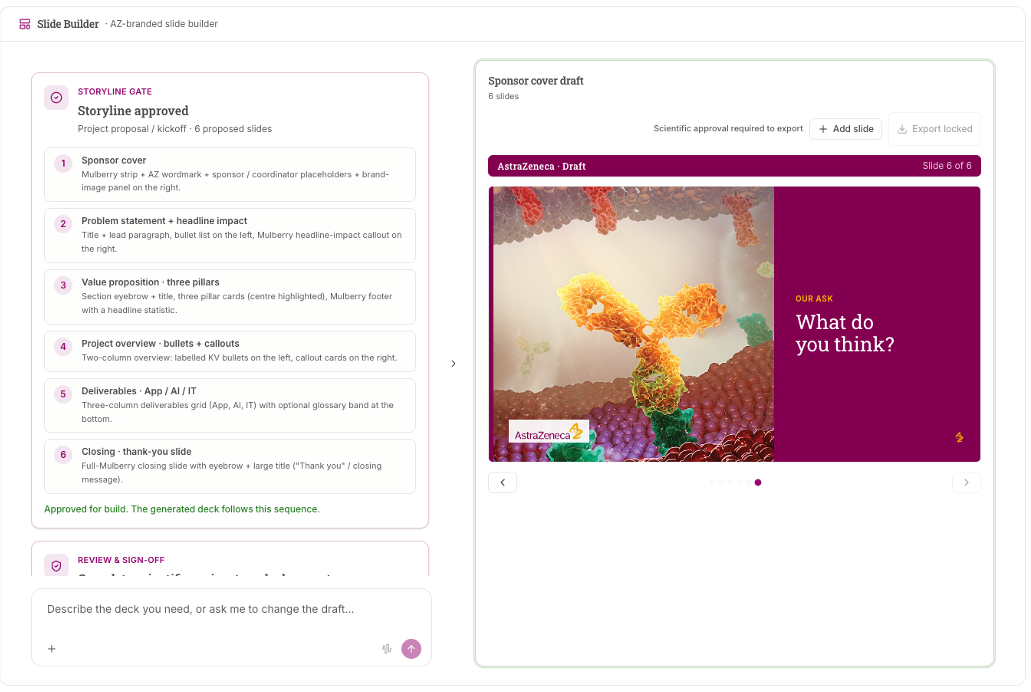
Separate storyline approval from scientific review. Keep the draft, its source checks and the next review decision visible together, rather than let a polished slide imply approval.
- The design change
- I designed the Slide Builder front end and review workflow within Global Medical Affairs. We explored a standalone builder and a proposed embedded workflow. The wider team owned the slide engine and integrations.
- What happened
- The August prototype shows the review decisions, not a production release. A July theme experiment exposed font and wrapping problems; handoff was still in progress. Workbench scope and delivery decisions follow in the full story.
- Role
- My contract title was Senior UI/UX Business Analyst; I also worked as a UX designer and AI engineer. I designed and built across compliance, internal products, forecasting and medical AI, with business owners and engineering teams.
Facts
- Engagement
- August 2025 to August 2026
- Contract title
- Senior UI/UX Business Analyst
- Business units
- US Oncology, then Global Medical Affairs from May 2026
- Released
- Risk register, March 2026. Spec by me, built by ECS.
- PinkPulse
- Working resource hub for the breast franchise; I designed its discovery and interface directions.
- AI Workbench
- Working Global Medical Affairs product; my interface and workflow prototypes shaped the shared experience.
- Worked with
- A Compliance business owner and reviewers, AstraZeneca's delivery team ECS in India, medical specialists, engineers and a leadership sponsor
Slide Builder: keeping review attached to the draft
A convincing deck still needs a review
Medical teams needed to turn source material into branded training slides. A polished deck was only part of the problem. Reviewers needed to see where a claim came from, correct it and understand whether the draft was ready to share.
I designed the front-end experience and the points where people would review the work. The wider team owned the slide engine and technical integrations. We explored a standalone builder and a proposed slide-making step inside the medical-content workflow.
Where a person has to decide
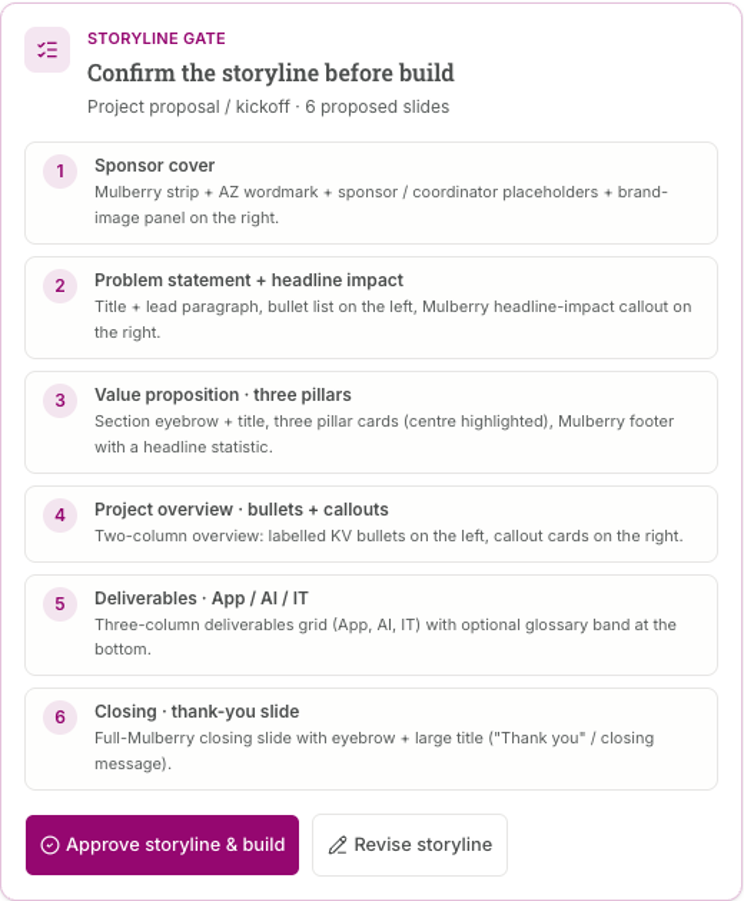
The business chose protocol-training decks as its first content pilot. I designed the workflow around a training producer bringing a study protocol and older decks, an agent proposing the storyline and a scientific reviewer checking each claim. The intended rule was simple: a person checks the draft before it can leave the workflow.
The specification required the agent to mark generated or unsourced rows. A reviewer would confirm each row, with no confirm-all button, before a named person approved it. Every factual claim needed its own citation. Drafting stayed open; approval and export were gated.
Scope
These rules lived in the specification and decision records. Some of the gate logic was written and tested on its own, but it was never connected to the screens people used. Read this as a design, not a working control.
From draft to approved, and back

Approval covers exactly what was approved
I tied approval to a fingerprint of the claims, citations and sources the reviewer saw. If any of those changed afterwards, the approval went stale and export locked again.
An agent can't check its own work
An agent may not both write a claim and verify its citation, and an agent's verdict never counts toward approval. Without that rule, a claim could reach the approval step without a person's judgment ever touching it.
Record what the agent did, not only where its answer came from
In May my manager set a hard requirement for the study-governance use case: every action the agent takes has to be auditable. Citations showed where an answer came from. They didn't show what the agent did to produce it. I wrote a decision record for a separate, append-only log of every agent step: which agent ran, which skill it used, what it read, and what a person approved, rejected or corrected, in order. A step a person had set to approve automatically is logged as automatic, so an auditor can't mistake it for a human decision.
Scope
I built the log as a tested library in the prototype, holding records in memory. The audit view and the compliance export were specified but not built.
The gates in the prototype
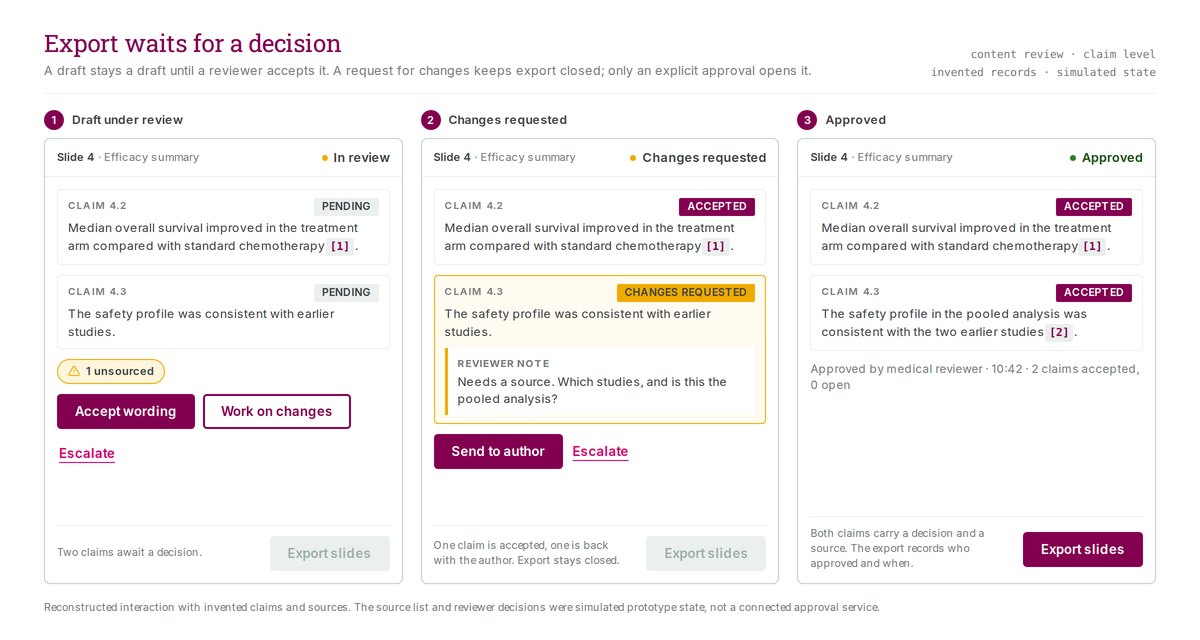
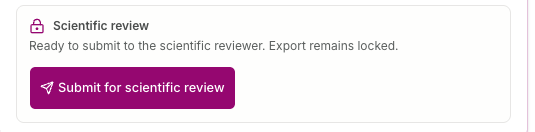
Locked, then approved

Three proposed review steps
In mid-July I explored how Slide Builder could sit inside the medical-content workflow. The design separated three reviews: structure and instructional format, scientific claims, and conversion to a reusable branded template. These were the proposed review steps, not proof that a connected system completed them.
The same week, the team held its first working session with the training team who would use it. I worked from its transcript. The scientific reviewer carried the most risk, and one protocol training could need input from seven stakeholders.
Label the empty gate rather than let it look full
At the scientific reviewer's gate, the prototype reported four accuracy checks as passing on every draft. No accuracy model sat behind them. I argued for labelling the checklist "not yet automated" in the interface. It looks worse in a demo than a row of green ticks. But a reviewer who trusts a check that never ran will stop trusting the whole system the first time something slips through.
Scope
This was discovery research. The reviewer hadn't used the built pipeline, so the trust risk is a prediction from the design, not something I observed.
Automate the chase, not the judgment
The scientific reviewer's time went on gathering input, not on the scientific call itself. The study-review build already had a reminder agent. I proposed reusing it to collect input from the experts, and left the approval with the reviewer. It was the same split I had drawn in March for the research-review coordinator: the agent drafts and chases, and people decide.
What the experiment exposed
A small July experiment checked whether an exported slide inherited the PowerPoint template's theme. The main color changed when the theme changed. The same renders exposed font substitution and text-wrapping problems. That supported the next build decision; it did not establish a finished exporter.
By August I was preparing design references, onboarding material and code for the next team. The records still describe handoff in progress. The work here shows my prototype and review decisions, not a production release or completed team adoption.
What I was asked to do
One workspace for several AI tasks
A new assignment in May
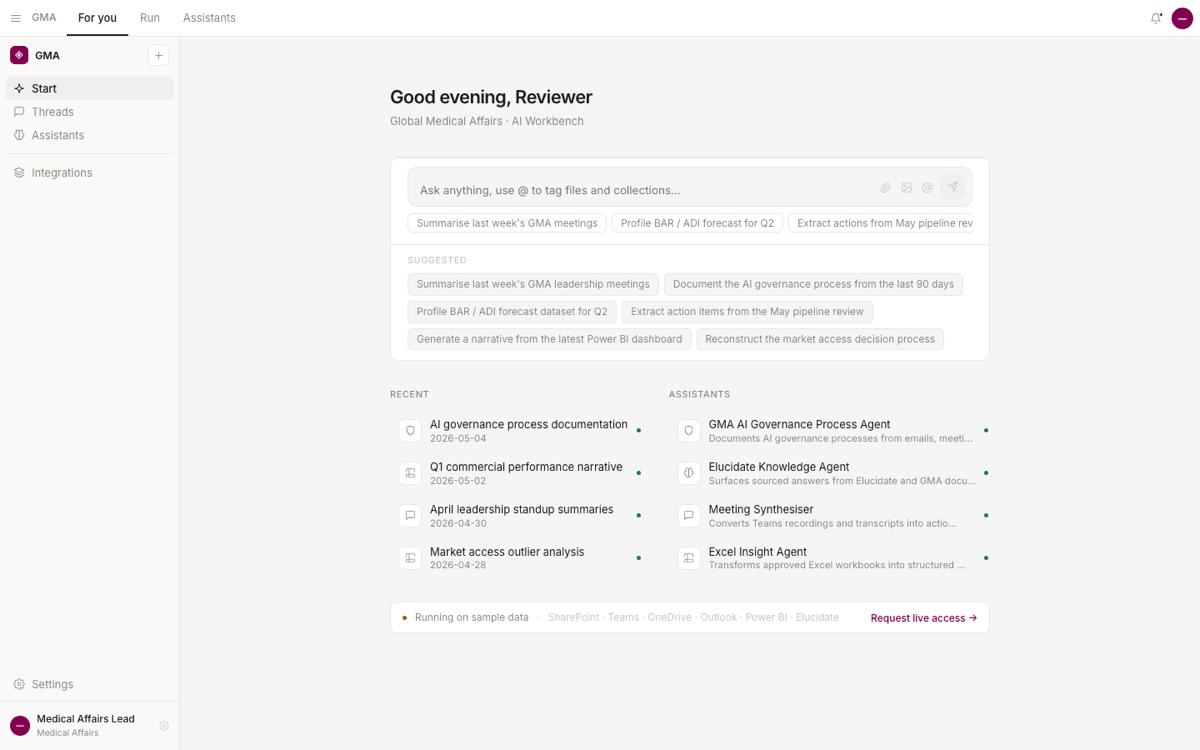
In May 2026 I moved from the risk register to the Global Medical Affairs AI Workbench. The medical organization was running AI projects one at a time, each with its own tools and its own review habits. The program's answer was the Workbench, one workspace for several AI-assisted tasks with one set of review rules.
I worked on it as a UI/UX Business Analyst & AI Engineer. I joined to design the shared interface, and I built its prototypes with AI coding agents. Over the next four months the job grew. By August I also kept the backlog for the first content pilot, checked the plan against the people available to build it, and wrote down the questions Compliance needed to answer.
On 22 June the sponsor said the work was too slow and the interface showed features that did not work yet. The team cut the leadership demo to two use cases. I wrote the rule for how to show them: build through the human approval step, and label analytics, repeat runs and role handoffs as mock-ups. The lineup changed again before July, but the distinction between working and illustrated behavior stayed necessary.
Contribution
Leadership and the program sponsor set the direction. Engineers owned the backends, and business leads owned the domain workflows. I framed options, recommended, specified and designed. Where a number is my own estimate, I say so.
Turning a wish list into a backlog
A list anyone could add to
By August the content pilot's feature list held 73 asks. Anyone could add to it, and plenty of people did. Rows had no size and no owner who could say no, and nothing recorded what had been ruled out. Translation, cut from the first iteration, came back on 21 August, and the list couldn't say who had cut it or when.
The same day I restructured the list. 20 items went to Committed, 46 to a parking lot and 7 to Declined. A committed item needed an owner, a date and a reason tied to a source, such as a process step, a rule or a user's own words. I added a size to every committed item. With one part-time backend developer, a list without costs was a wish list.
That day the program's architect also made compliance a day-one requirement. The backlog carried it as one medium-sized item. I broke it into the seven pieces of work it really was, and Committed went from 20 items to 27.
73 items, three destinations

A decline needs a date and a decider
I made Declined its own state, with a date and the name of whoever decided. When I applied that rule to the seven declined items, none had a date and two had already been contradicted. I left the gaps showing instead of back-filling them. The missing dates were the finding, and they explained how translation had come back.
Checking the plan against the people
14 to 26 person-weeks against about 2
A September executive demo already had a lineup of nine features. To see whether the team could build it, I sized every committed item and turned each size into a range of person-weeks.
The nine features needed 14 to 26 person-weeks. Supply before the demo was about 2 person-weeks, spread across three part-time people. Only one of them could do backend work, and every one of the nine features needed it. That left about one person-week for the part that mattered.
The sizes were my judgment, so I tested a more optimistic set: small items at 0.25 to 0.5 person-weeks, medium at 1 to 2, and large at 3 to 5. Those reduced size bands put the same nine features at 9.5 to 18 person-weeks, still well above the backend time available. The workbook calls this scenario "halved," but it does not halve every estimate.
Demand against supply, in person-weeks

Recommend three features, and label the rest
I recommended cutting the lineup from nine features to three: one real training deck built to demo quality, the export path that produces an editable slide file, and a fix for brand colors dropping out on export. The other six would still appear, labelled plainly as unbuilt or mocked. Even three features used all the backend time available, and I wrote that down too.
Scope
This was a recommendation in the tracker I kept. I have no record of whether the program adopted it.
Controls before code
Eight questions, each with a default
A session with Compliance was set for 24 August. I didn't want that hour spent on topics, so I wrote eight control questions and four yes-or-no decisions ahead of it.
Each question said why it mattered and what answer would close it. Can the agent write a claim the protocol doesn't support, and what stops it? For any exported deck, can we say who generated it, from which sources, and who approved it?
Each one also carried a default the build would follow if nobody answered. For unsupported claims, the default was to warn and log a reason for any override, then block outright in the next iteration. Any default still standing at the demo would be reported as "decided by default, decider: nobody".
The questions and their defaults

Every open question gets a default
An unanswered compliance question doesn't stop a build. The team builds something anyway, and nobody records the choice. Writing the default down turned that silence into a visible decision that Compliance could overrule.
Scope
I don't have a record of what the 24 August session decided.
Who accepts the work
The backlog also recorded who would accept each item as done. Of the 27 committed items, 19 named someone, some only provisionally. Eight named nobody, including all seven compliance items.
I logged each gap as a blocker with a single owner, because a blocker with two owners has none.
Testing the AI's answers before claiming anything
A slide that claimed too much
In June 2026 I scoped a second use case: an assistant that helps medical writers draft Standard Responses. A Standard Response is a short, balanced answer to a doctor's question about a medicine. The writers already used another AI tool for this.
My first slide for the business leads gave that tool a quality score. On 8 June my manager pointed out that we hadn't run that comparison yet, so we couldn't claim those numbers. I took them out and rebuilt the deck around the writers' problem.
On 9 June I worked with the medical-writing lead to narrow the comparison. Writers often updated a section rather than wrote a whole Standard Response. We needed the exact request and a human reference, potentially just one paragraph. Saving time on an update was harder to isolate, so a new response remained another proposed test case.
Plan the test before making the claim
I drafted an evaluation plan. Give the assistant, the current tool and the original human answer the same inputs. Hide which draft is which. Agree the scorecard before anyone scores. Plant known errors that the reviewer has to catch. Any made-up fact or citation fails the test, however good the draft looks. Engineers would run it, subject experts would score it, and the business lead would sign off.
When it can't answer, it stops and says why
I also set out nine cases where the assistant can't or shouldn't answer, such as a missing source, a request for advice, or two sources that disagree. Each got one plain action and a sample line. The rule under all of them was never to guess to fill a gap. Stop, say what's missing, and point to a person. A second list named 19 ways a draft could go wrong, in four groups, with the check that should catch each one.
Scope
Both were design documents from late June. None of the nine states was built or tested.
Agree the goal in writing
On 6 July the medical-writing lead said the team wasn't agreed on the goal, and asked for one written objective that everyone signs. There wasn't time to run a side-by-side test before the leadership session, so I drafted the objective that day. It called the work a feasibility test, not a decision to replace the current tool, and named two test cases and what "done" meant.
Scope
The test never ran, and I have no record that anyone signed the objective. After the July session this lane paused and the slide pilot went ahead. No accuracy or time-saved result exists.
Explaining it to whoever came next
Six use cases looked like six demos
By June new people kept joining, each use case looked like a separate demo, and nobody could explain the whole thing in one breath.
The answer was a Start Here deck of twelve short slides, plain words first, with the real product terms saved for slide 11. It hung the whole program on one question: what kind of work is this? The answer picks one of four routes, and everything else follows from it. The deck mirrored two FigJam maps: a landscape map of the program and an orientation map.
The program's decision records gave that map a useful split. A request to one tool stayed a direct conversation; work that needed several tools gained a supervisor, a visible plan and a place to reconcile their outputs. The heavier view was earned by the task, not shown to everyone by default.
The home screen also had to show work waiting for a person. The team weighed a permanent empty composer, a separate ledger and separate project inboxes. On 21 May it chose one work-in-progress home with an "Awaiting you" queue for approvals, sign-offs, anomalies and access requests. A week later the plain chat box came back. Reviewers, me included, had already said the home looked too busy, and nobody had tried the queue with real users. The queue moved to a later, separate surface. Its logic was written and tested in code, but no screen used it.
One question, four routes

A handoff anyone could run
In August the engineer due to receive my handoff left the program. So at the end of August an onboarding deck set out a working session a new facilitator could run without inventing the process. It takes sixty minutes and ends in a short brief.
Every note in the room gets one label: confirmed, assumption, question, decision or blocker. The rule I cared most about sits in the middle. If the evidence or the owner is missing, the note stays a question. Agreeing in the room doesn't turn it into a decision.
Scope
The format was meant for whoever picked the work up. I have no record anyone ran it.
Changing course on the record
Decisions that didn't stay settled
The program kept its design decisions as dated records, and a record could be reversed or re-opened like any other. Four of them show the team changing its mind in writing instead of defending the first answer.
Two prototypes became one
For part of May the plan was to keep two prototypes: a vision version that could show what the architecture might become, and a buildable version bound by every decision record. The split was written down as a decision record on the day it ended. The buildable branch was cut from the main line and deleted that same day, once a single working session showed that keeping two versions in step cost more than it bought for a prototype one person maintained. The record stays in the corpus with its reversed status showing, and its own note on the failure is the honest summary: the decision did not survive contact with use. The buildable surface became a filtered view of the one codebase instead.
Scope
Decision record from May 2026, reversed the day it was written down. Demo prototype on sample data throughout.
When the example and the code disagree, count the assistants
The program's glossary used a data query as its example of a single assistant. That had been a habit, not a finding. When the budget task's scope was finally read closely, it needed three kinds of agent at once: reading the source documents, pulling the planning data, and checking the numbers against each other. By the supervisor rule that made it a saved multi-assistant run, not a single assistant. The record moved the example instead of bending the definition, and left a test any future case could reuse: count the agent families a task genuinely needs, and the classification names itself.
Contribution
Program-team decision record from May 2026. The prototype's code already had the multi-assistant shape; the glossary was what changed.
A recorded ask re-opened a settled decision
An earlier record had settled that anyone could save a multi-assistant run, with no curated tier. Then a meeting transcript showed a stakeholder asking for exactly the curated thing: ready-made runs, put together by the program team, because most people couldn't be expected to compose agent teams themselves. The team re-opened the decision instead of defending it, and chose the middle option: one saved type, with personal and published visibility, and a manual promotion to published. The promotion is the moment governance applies, and in the design the published label doubles as a trust signal.
Scope
Two decision records from May 2026; the later one names the claim it replaces. Design decision only.
A tabbed rebuild that didn't last
Evidence planning started as a locked sequence: score a gap, search the archive, then create a new one. In July it un-gated into two tabs with no required order, and the archive search became a duplicate watch that ran while the reviewer typed. That rebuild closed an honesty gap: the old screen said a near-duplicate couldn't be created, but the submit button had no check behind it. The rebuild put the block in the code. Then a recording of the real process and repeated "too many clicks and stops" feedback removed the tabs. I took that feedback back to the team. The task was really one question, so it became a single prompt: the agent searches for duplicates, drafts the gap and writes the record, with one decision point before submit. The duplicate watch stayed, and a near-duplicate stayed a decision for a person rather than a silent block.
Contribution
Two decision records from July 2026 document the reversal; the second names the first and states what it replaced. The evidence-planning leads owned the workflow. Prototype on sample data.
Results
- I wrote the requirements for the July leadership session, 45 user stories covering two live demos and the shared shell around them. Leadership endorsed the Workbench and designated it a high priority, according to the session minutes.
- I restructured a 73-item feature list into 20 committed items, 46 parked and 7 declined, with an owner, a date, a reason and a size on every committed item.
- My estimate put the demo lineup at 14 to 26 person-weeks against about 2 available, and I recommended cutting it from nine features to three.
- I wrote 8 control questions and 4 decisions for Compliance, each with a stated default.
- I specified review rules for AI output. Approval is tied to the exact content, no agent verifies its own claims, and every flagged row is confirmed on its own.
- The program got an orientation deck that explained it through one question, and a sixty-minute handoff session format for whoever came next.
- My interface screens and review gates were prototypes within the broader Workbench programme. At handoff, I recorded the missing backend owner and the open business acceptance decision for the first content pilot so the next team could take them on.